



Key Takeaways
• Many 3PL warehouses require each product or variant to have a scannable barcode before receiving inventory.
• For unit-level identification, small sellers can often use a Code 128 barcode based on their SKU.
• EAN/UPC barcodes are required for retail, wholesale, marketplaces, or standardized product ID systems.
• A proper 3PL product label should include both a scannable barcode and human-readable SKU, along with variant details.
• Always confirm barcode type, label size, and scan requirements with your 3PL before printing labels in bulk.
Why Do 3PL Warehouses Require Product Barcodes?
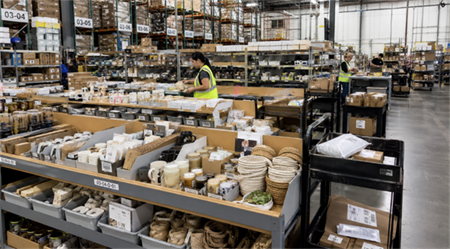
3PL warehouses rely on product barcodes to make receiving, picking, inventory counting, and shipping faster and more accurate. Without barcodes, warehouse staff must type SKU numbers manually, which increases errors, slows operations, and may result in relabeling fees or rejected shipments.
A proper 3PL product label usually includes:
• Scannable barcode — lets warehouse staff identify products quickly.
• Human-readable SKU — a backup if the barcode fails to scan.
• Product name or description — for visual confirmation.
• Variant information — such as size, color, scent, or pack count to prevent mix-ups.
• Optional carton quantity — helpful for case or pallet-level receiving.
Including these elements ensures each product variant can be efficiently tracked and verified by the 3PL, reducing errors and improving workflow.
Do You Need a UPC Code for 3PL, or Can You Use Your SKU?
Many small sellers wonder if their products require a UPC for 3PL. The answer depends on how the product is managed and where it will be sold.
• SKU: Your internal product identifier, which can include letters, numbers, or codes representing size, color, scent, or variant.
• Barcode: A scannable representation of the SKU or UPC.
• UPC/EAN: Standardized product identifiers for retail, wholesale, or marketplaces.
Most 3PL warehouses accept SKU-based Code 128 barcodes for internal scanning. Official UPC/EAN is only necessary when products are intended for:
• Amazon, Walmart, or other marketplaces.
• Retail stores or distributors that require GTIN verification.
• Compliance with official product ID standards.
For many small sellers, a Code 128 barcode for SKU is sufficient for warehouse operations, while UPC/EAN is required only for retail or marketplace compliance.
Note:
• Cost of official UPC: Purchasing official UPCs from GS1 typically involves a one-time fee plus possible annual renewal, depending on the region and code package.
• Risk considerations: Self-generated barcodes may not be accepted by retail platforms, Amazon, Walmart, or wholesale distributors if they require valid UPC/EAN verification. Always confirm with your 3PL whether internal SKU barcodes are permitted and test scanability with handheld scanners before mass printing.
Key takeaway:
Start with low-cost, self-generated barcodes for internal operations, and only invest in official UPC/EAN when your products require retail or marketplace recognition.
Understanding Different Barcode Types
Choosing the correct barcode type ensures smooth 3PL operations and minimizes errors.
Code 128 — Best for SKU-Based 3PL Labels
• Supports letters, numbers, and mixed SKU formats.
• Ideal for Shopify, WooCommerce, Etsy, Excel, or custom SKU lists.
• Works well for unit-level labels, internal inventory, and 3PL receiving.
• Supports batch or variant identification for small sellers.
Example SKUs:
• Rose Candle 200 g: CANDLE-ROSE-200
• Lavender Soap 100 g: SOAP-LAVENDER-100
Each SKU can be converted into a Code 128 barcode for easy scanning during receiving, picking, or storage.
UPC / EAN — For Retail or Marketplace Product Identification
• Required for retail POS, Amazon, Walmart, wholesale distributors.
• UPC-A is common in North America; EAN-13 is common globally.
• Must be valid GTINs, assigned by GS1 or authorized providers.
• Do not use randomly generated numbers, as marketplaces may verify ownership.
Code 128 is sufficient for 3PL warehouse scanning, while UPC/EAN ensures products are properly recognized in retail or marketplace systems.
GS1-128 / ITF-14 — Usually for Cartons, Cases, or Pallets
• Relevant when shipping full cartons, cases, or pallets to warehouses.
• Used for case-level receiving, pallet tracking, and advanced logistics workflows.
• Most small sellers can initially focus on unit-level SKU barcodes.
QR Codes — Useful for Marketing, Not Usually for 3PL Identification
• QR codes are good for product instructions, reorder links, warranty pages, or brand story.
• Do not use QR codes as the primary 3PL barcode unless explicitly accepted.
How Do You Turn SKUs Into Barcodes for a 3PL?
Step 1 — Create a Clean SKU System
• Assign unique SKUs for each product variant.
• Keep SKUs consistent and easy to read.
• Avoid special characters if your 3PL system has restrictions.
• Do not reuse SKUs for multiple variants.
Example SKUs for small sellers:
• Rose Candle 200 g: CANDLE-ROSE-200
• Lavender Soap 100 g: SOAP-LAVENDER-100
• Black T-shirt Medium: TSHIRT-BLACK-M
• Silver Ring Size 7: RING-SILVER-7
Step 2 — Confirm Barcode Rules With Your 3PL
Ask your 3PL:
• Can I use my SKU as the barcode value?
• Do you accept Code 128 barcodes?
• Do you require UPC or EAN instead?
• Should the barcode appear on each unit, carton, or both?
• Are special characters allowed?
• Should the human-readable SKU appear under the barcode?
Step 3 — Bulk Generate Barcodes From Your SKUs
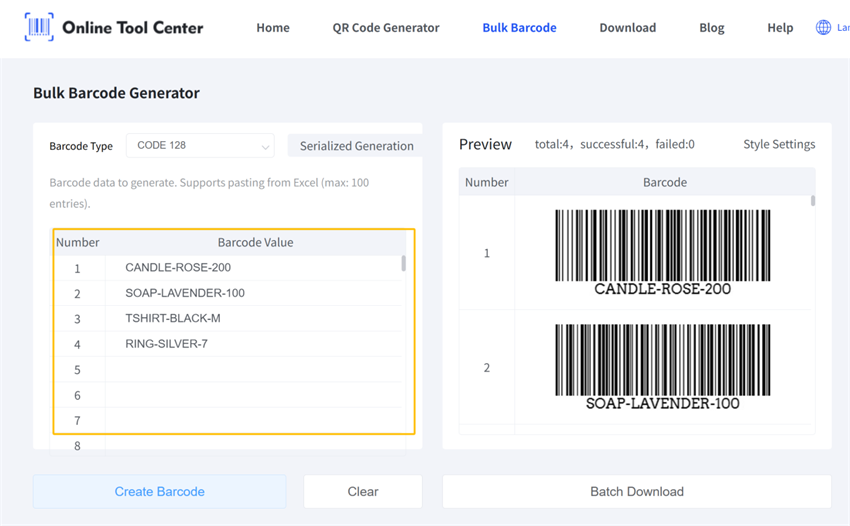
• Copy your SKU list from Excel or Google Sheets.
• Paste them into a bulk barcode generator.
• Select Code 128 for SKU-based labels (unless 3PL requires another format).
• Generate barcode images in one batch.
• Download the files and integrate them into your label template.
• Organize files by product, SKU, or shipment batch for easy printing.
Tip: Using a bulk barcode generator is the fastest way to prepare scannable labels for all your product variants. Excel users especially benefit—you can copy your SKU column directly from Excel and paste it into the generator to create multiple barcodes in seconds.
Recommended Reading:
How to Generate Multiple Barcodes for Excel
Step 4 — Print, Apply, and Test Labels
• Print a small test batch first.
• Place labels on flat, visible surfaces.
• Include both barcode and human-readable SKU.
• Avoid seams, curves, glossy surfaces, or damaged packaging.
• Scan test labels with a handheld scanner or mobile app before shipping to the 3PL.
FAQ — 3PL Barcodes for Small Sellers
Q: Can I use my SKU as a barcode for a 3PL?A: Yes, if the 3PL accepts SKU-based barcodes. Code 128 is commonly used because it supports letters and numbers.
Q: Does every 3PL require UPC codes?A: No. Some 3PLs accept internal SKU barcodes, while others require UPC, EAN, or specific barcode formats. Always confirm with your 3PL before printing.
Q: What is the best barcode type for Shopify SKUs?A: Code 128 is practical for Shopify-style alphanumeric SKUs, as UPC/EAN only support numeric formats.
Q: Can I bulk generate barcodes from Excel?A: Yes. Copy your SKU column from Excel or Google Sheets, paste into a bulk barcode generator, and download images for printing.
Q: What if my 3PL rejects my barcode?A: Check whether the barcode value matches the SKU in the 3PL system, whether the barcode type is accepted, and whether print quality, size, and label placement meet their receiving rules.
Final Thoughts
Creating barcodes for 3PL product labels does not have to be complicated. For small sellers, the most practical workflow is:
1. Define a clean SKU for each product variant.
2. Confirm 3PL barcode requirements.
3. Generate Code 128 barcodes from your SKU list.
4. Print and apply labels, including human-readable SKU.
5. Test scanability before shipping.
Use official UPC/EAN only if required by retail, marketplace, or wholesale systems. With this approach, small sellers can ensure smooth warehouse operations, minimize errors, and streamline inventory management.
