




Key Takeaways:
✔️ Barcodes improve inventory management, reduce manual errors, and streamline workflows for small pharmacies, clinics, labs, and medical supply businesses.
✔️ Code 128 is ideal for internal SKU and batch tracking; EAN/UPC is appropriate for retail distribution; GS1 DataMatrix applies for regulated medical devices requiring UDI compliance.
✔️ Small businesses can generate scannable, print-ready barcodes using reliable online tools without complex enterprise systems.
✔️ Proper printing, label placement, and scan verification are essential; misapplied barcodes can cause scanning failures and inventory mistakes.
1. What Barcodes Are & Why They Matter for Healthcare Products
Barcodes encode numbers or text into patterns readable by scanners. In healthcare, they help:
• Track medical supplies, consumables, clinical kits, and durable medical equipment (DME).
• Maintain inventory accuracy in clinics, small pharmacies, and laboratories.
• Reduce manual entry errors and improve workflow efficiency.
• Provide visibility for storage, dispensing, and supply tracking.
Example:
A small clinic managing over 300 consumable items implemented Code 128 barcodes for internal storage. Inventory checks became 40% faster, and errors dropped significantly.
2. Choosing the Right Barcode Type
The correct barcode depends on use case, sales channel, and regulatory requirements.
Code 128 — Internal Inventory and SKU Labels
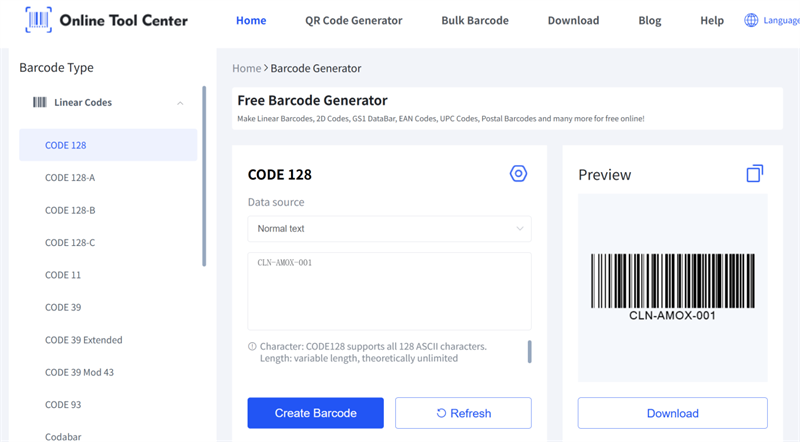
• Supports alphanumeric data and high-density encoding.
• Best for internal product IDs, SKUs, batch/lot numbers, and storage labels.
• Ideal for boxes, kits, or clinic/lab inventory.
Usage: Labeling small medical devices, consumables, or clinic storage bins.
EAN/UPC — Retail-Ready Products
• Required when products are sold through stores or online marketplaces.
• EAN-13 (global retail) and UPC-A (North America) are widely recognized by retail scanners.
Usage: Over-the-counter medical supplies, first-aid kits, or consumer-facing products.
GS1 DataMatrix — Regulated Healthcare Products
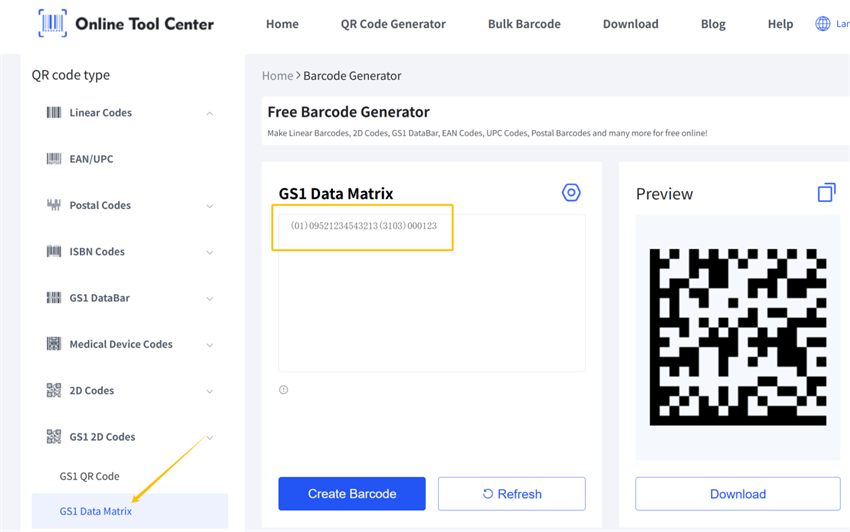
• Needed for medical devices, prescription drugs, or regulated supply chains.
• Often required by FDA UDI standards for traceability.
• Includes human-readable text and structured identifiers.
Small businesses typically use Code 128 or EAN/UPC internally. Regulated products must follow GS1/FDA requirements and should not be treated as “just scannable.”
3. Step-by-Step: How to Generate Barcodes
Prepare Your Product Identifiers
Assign unique codes to each product or batch:
✔️ Clinical gloves – CLN001
✔️ Syringes – SYR002
✔️ First aid kit – FAKIT01
These codes are what the barcode will encode. Avoid reusing the same code for multiple SKUs.
Select the Barcode Symbology
• Code 128 — internal inventory, SKU management
• EAN/UPC — retail distribution
• 2D formats — regulated medical devices if required
Choose before printing to ensure labels match their intended purpose.
Generate the Barcode
Use a reliable online barcode generator:
1. Enter your product identifier.
2. Select the barcode type (Code 128 / EAN / UPC).
3. Adjust size and resolution (300 DPI recommended).
4. Generate and download in PNG, SVG, or other format.

Organize Files
Keep barcode files organized by product type, barcode format, or business use. For example, separate internal Code 128 labels from retail EAN/UPC labels and any regulated-product labels that require compliance review.
Use clear file names that include the product name, product identifier, and barcode type. This helps prevent printing mistakes as your healthcare product catalog grows.
4. Printing and Applying Barcodes
Printing Best Practices
• Use thermal or laser printers on high-contrast labels.
• Maintain quiet zones (white space) around the barcode.
• Avoid curved, textured, or reflective surfaces.
• Ensure barcode size is sufficient for scanning (≥1 inch wide).
Placement Guidance
• Outer packaging or product boxes.
• Near product ID or description text.
• Flat, accessible areas on kits or storage containers.
Example: A small pharmacy initially printed tiny labels that failed at checkout. Enlarging the Code 128 barcode solved scanning issues immediately.
5. Scannability and Quality Control
Before large-scale printing:
• Test each label with a handheld scanner or mobile app.
• Verify print clarity, contrast, quiet zone, and orientation.
• Confirm scan consistency from multiple angles.
Even properly generated barcodes can fail if printed poorly or placed incorrectly.
6. Compliance Considerations
• Internal inventory: Code 128 is sufficient for SKUs, batch, and storage tracking.
• Retail products: EAN/UPC required for marketplaces or store shelves.
• Regulated products: GS1 DataMatrix or other standards required for UDI, FDA, or supply-chain compliance.
Small businesses should define product use first, then choose the barcode type accordingly. Avoid assuming internal barcode methods meet regulatory standards.
7. Frequently Asked Questions (FAQs)
Q1: Do healthcare products always need special barcode formats?
A: No. Internal inventory typically uses Code 128. Retail or regulated products require EAN/UPC or 2D formats.
Q2: Can the same barcode be reused on multiple products?
A: No. Each SKU or batch must have a unique barcode to prevent confusion.
Q3: What if a barcode fails to scan?
A: Check print size, contrast, quiet zone, label material, and placement. Increasing size or improving print quality usually solves the issue.
Closing & Next Steps
Generating accurate, scannable barcodes does not have to be complicated. For small healthcare businesses, the key is choosing the right barcode type for the use case, printing it clearly, and verifying scan performance before rollout.
If you are managing healthcare products, start by defining your product codes, selecting Code 128 or EAN/UPC where appropriate, and testing each barcode with a real scanner before and after printing.
