



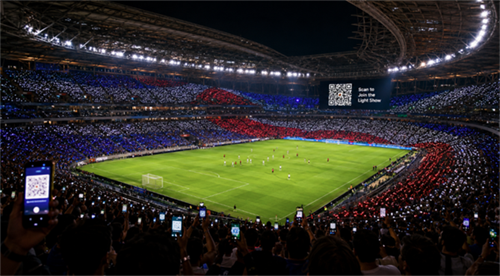
During a World Cup football match, a QR code appeared on the stadium screen. Fans scanned it, and thousands of phones across the stands joined a synchronized light show.
It was a smart fan-engagement moment. It also raised a practical question many people now ask at stadiums, concerts, restaurants, parking meters, and public events:
Is it safe to scan a QR code in a public place?
The answer is not simply yes or no.
A QR code shown on an official stadium screen for a clearly explained light show is usually lower risk than a random QR code on a wall or flyer. But it is still a link. Safety depends on where it leads, what permissions it requests, and whether the experience matches the context.
For brands and event organizers, this World Cup QR code moment offers a bigger lesson: people do not scan QR codes just because they work. They scan them when they understand and trust the experience.
What Happened With the World Cup QR Code Light Show?
The stadium QR code most likely opened a mobile web experience that synchronized fans' phones with the live show. The QR code was only the entry point; the page or app-like experience handled the timing and visual effect.
In a large-event setting, this type of QR code can connect thousands of phones to the same digital experience. Once users scan the code, they may land on a page that displays flashing colors, plays timed animations, or asks for permission to use a phone feature.
The effect may come from the phone screen, the flashlight, or a browser-based experience that runs after the user joins. The exact setup depends on the event technology provider.
What matters is the user journey:
The fan sees the QR code.The fan scans it.The phone opens a destination.The fan chooses whether to continue.The page runs the light show experience.
That means the key safety question is not "Can a QR code control my phone?" It is:
What does the QR code open, and what does that page ask me to do?
Can a World Cup QR Code Control Your Phone Flashlight?
A QR code cannot control your flashlight by itself. It can only send your phone to a destination, such as a web page. Any action involving the flashlight, camera, location, or notifications normally depends on the page and the permissions users grant.
This distinction is important because many people overestimate what a QR code can do on its own.
A QR code is not an app. It is not a remote-control button. It is a scannable way to open information, usually a URL. The risk begins after the scan, when the user lands on a page and decides what to allow.
For a stadium light show, a permission request may be reasonable if it clearly supports the experience. For example, a page may need access to a phone feature to create a synchronized effect. But the request should be understandable.
A light show does not need your banking details.A fan experience should not ask for your email password.A simple event page should not push an unknown app download.
From a QR campaign design perspective, the safest experience is the one with the fewest surprises. If the scan result behaves exactly as the screen promised, users feel in control. If it redirects, asks for unrelated permissions, or demands personal data, trust drops immediately.
Is It Safe to Scan a Stadium QR Code at a World Cup Match?
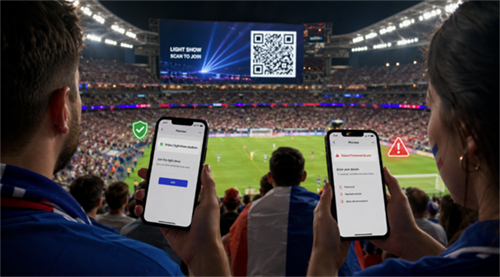
It is usually reasonable to scan a QR code displayed on an official stadium screen when the purpose is clear, such as joining a light show. But users should still preview the destination, avoid sensitive data entry, and reject permission requests that do not match the experience.
The World Cup context matters. A QR code displayed on a stadium screen, supported by an event announcement, is not the same as an unknown sticker on a street pole. The source is more visible. The purpose is clearer. The experience is shared by the crowd.
Still, "official-looking" should not mean "scan without thinking."
Large events often use third-party platforms for fan engagement, ticketing, analytics, Wi-Fi, sponsor campaigns, or app downloads. A page can be legitimate and still collect data. A campaign can be safe from malware but unclear about privacy. A link can be useful but still too vague for users to trust.
A better rule is:
Scan based on context, not habit.
If the code appears on an official screen, the message is clear, the URL looks relevant, and the page does not ask for unnecessary information, the risk is usually low. If the destination looks unrelated or the page asks for sensitive details, leave.
Why Stadium QR Codes Make People Nervous
People worry about stadium QR codes because they cannot read the QR pattern directly before scanning. That lack of visibility makes trust depend on the screen, the message, the domain, and the next step after the scan.
This concern is not irrational. QR codes are easy to use because they hide complexity. The user does not have to type a long URL. But that also means the destination is less visible at first glance.
There are three real concerns behind the hesitation.
First, QR codes can hide the final destination. Many phones preview the URL, but users often tap too quickly. If the domain is misspelled, shortened, or unrelated to the event, the user may not notice.
Second, QR codes can be used for phishing. In a QR phishing attack, the code sends users to a fake login, payment, ticketing, or account-verification page. The code itself is not the scam; the destination is.
Third, public QR codes can blur the line between participation and permission. At a live event, people act quickly. They want to join what everyone else is doing. That moment of excitement can make them less careful about what they approve.
For this reason, QR code safety is not only a cybersecurity issue. It is also a user-experience issue.
The more clearly a QR code explains itself before the scan, the safer it feels after the scan.
What Fans Should Check Before Scanning Stadium QR Codes
Before scanning a QR code at a stadium or public event, check three things: who is displaying it, where it leads, and what it asks you to do next.
You do not need to be a cybersecurity expert. You only need a quick scan habit.
Look at the source. Is the QR code on the official stadium screen, event signage, team app, or verified website? If yes, the context is stronger. If it appears on a random flyer, sticker, or social media screenshot, be more cautious.
Preview the link before opening it. The domain should look related to the event, venue, team, or brand. Be careful with strange spelling, unrelated domains, or generic short links with no context.
Match the request to the purpose. A light show may need your screen or a related permission. It should not need your bank card, password, government ID, or unrelated app installation.
Avoid downloading files from unfamiliar websites. If an event requires an app, use the official App Store or Google Play listing.
If the page feels wrong, close it. There is no need to participate in every QR experience, even at a major event.
Final Verdict: Should You Scan a World Cup QR Code?
A World Cup QR code shown on a stadium screen for a clearly explained light show is usually safe to scan. But fans should still treat it like any other link: check the destination, question unnecessary permissions, and never enter sensitive information just because a big screen tells them to scan.
The broader lesson is simple: the best QR codes are transparent. If people know who created the QR code, why they should scan it, and what will happen next, they are far more likely to trust the experience.
Need a QR code for a website, menu, event page, or campaign? Try our free online QR code generator, test the code on your phone, and make sure the destination is clear before sharing it.
