



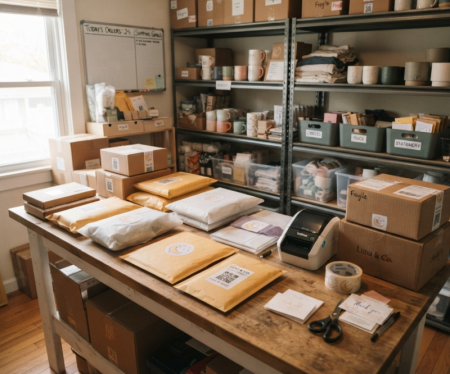
For Shopify store owners, one of the most overlooked marketing opportunities is the product package that arrives at the customer's doorstep. Turning a one-time buyer into a repeat customer often starts with the unboxing experience. By adding a QR code to your shipping boxes, you create a simple connection between the package and your online store.
Quick Summary: What This Guide Covers
• The Strategy: Creative qr code ideas for e-commerce that boost customer lifetime value (LTV).
• The Benefits: How a qr code for product packaging slashes support costs and builds brand loyalty.
• The Execution: Exactly how to make a qr code for packaging using a free, high-resolution shopify qr code generator.
Why QR Codes on Packaging are a Game-Changer for Shopify Stores
Every package you ship is a piece of premium brand real estate. Leaving it blank or filling it only with shipping data is a missed revenue opportunity. Using an online QR code generator makes it easier to connect your packaging with your digital marketing efforts.
Bridging the Gap Between Offline and Online Channelss
When a customer receives a physical product, they temporarily disconnect from your online store.
A QR code on product packaging gives customers a quick way to return to your online store, support page, or community.
With a simple smartphone scan, they can transition from holding your product to interacting with your Shopify community, tracking pages, or customer service portals without typing a single URL.
Boosting Customer Lifetime Value (LTV) Affordably
According to industry benchmarks, acquiring a new customer costs 5 times more than retaining an existing one. Boosting your Customer Lifetime Value (LTV) relies on nailing the post-purchase experience.
Compared with post-purchase emails, a QR code on the shipping box reaches customers at the moment they receive the product, when engagement is often highest.
4 Creative QR Code Ideas for E-commerce Packaging
To get better results, use more targeted QR code destinations than a generic "Visit Our Website" link.
To inspire your next packaging run, here are 4 high-converting qr code ideas for e-commerce used by leading global brands.
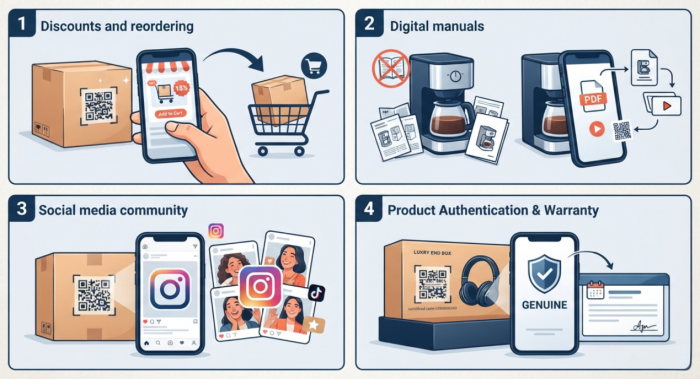
Idea 1: Drive Repeat Purchases with "One-Scan" Reordering & Discounts
The fastest way to boost Shopify sales is to make the reordering process effortless. With a Shopify QR code generator, you can create a dynamic code that links to a pre-filled cart with the same item or to a dedicated VIP landing page.
Conversion Tip: Pair the code with an enticing discount. Printing a call-to-action like "Scan to unlock 15% off your next order!" gives consumers an immediate, trackable incentive to buy again.
Idea 2: Replace Bulky Manuals with Digital Instruction Guides
If your product requires setup, assembly, or specialized care, paper manuals can quickly clutter your packaging and inflate your printing costs.
Hardware, beauty, and apparel brands often use QR codes on product packaging to provide digital user guides. Scanning the code opens an elegant PDF manual or a quick setup video playlist, lowering return rates and saving thousands in paper printing fees.
Idea 3: Build an Active Community via Social Media & UGC
Word-of-mouth marketing is incredibly powerful for e-commerce growth. You can configure your online code to redirect users directly to your Instagram, TikTok, or native Shopify product review page.
Encourage customers to share their excitement by printing a prompt next to the code: "Loving your purchase? Scan here to tag us on Instagram and share your unboxing using #MyBrandStyle!" This can encourage customers to create and share user-generated content.
Idea 4: Instant Product Authentication & Warranty Activation
For luxury apparel, high-end electronics, or cosmetics, authenticity matters. Protect your brand reputation by using a serialized qr code generator to assign a unique identity to every product box.
Upon unboxing, customers scan the code to verify their purchase is genuine and instantly register their warranty details. This step can help customers verify the product and register their warranty, while also collecting useful customer information for future follow-up.
How to Make a QR Code for Packaging: Step-by-Step Guide
Ready to upgrade your shipping boxes, custom mailers, or product hangtags? Follow this streamlined process to learn how to make a qr code for packaging that scales seamlessly with your business.
1.Define Your Marketing Goal and Destination URL
Determine what you want to achieve (e.g., product reorders, social growth, or video views). Prepare the exact URL destination. We highly recommend using a dynamic QR code over a static one; dynamic codes allow you to change the destination link later without ever needing to reprint your physical packaging.
2.Select a Professional Shopify QR Code Generator
Navigate to our advanced online platform. Our shopify qr code generator is highly intuitive, featuring advanced styling options to embed logos, customize colors, and match your brand. It supports high-resolution, print-ready SVG exports, is completely watermark-free, and is 100% free to use.

3.Customize to Match Your Shopify Brand Identity
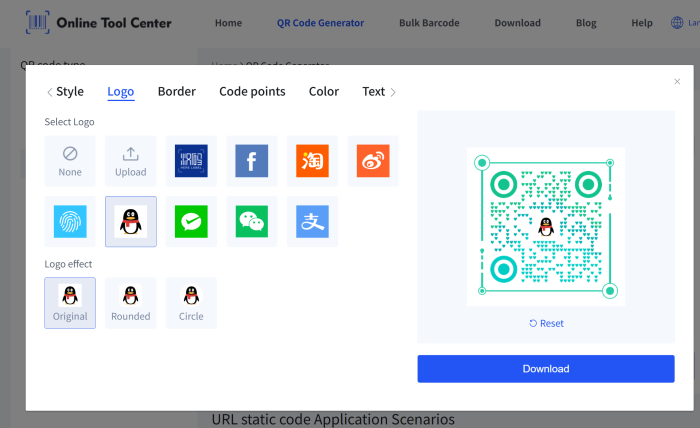
Don't settle for boring black-and-white squares. Use our design dashboard to inject your store's exact hex color codes, choose custom eye patterns, and upload your brand logo right into the center of the code. A branded design can make the code look more professional and easier to notice.
4.Export in High-Resolution Vector Format
When your design is ready, download the file.
Crucial Rule: For commercial printing, always export your code in vector formats like SVG or PDF. Avoid low-resolution PNG or JPG files for packaging, since raster images can become blurry or harder to scan when resized.
Best Practices for Designing Packaging QR Codes
To improve scan rates and reduce technical issues, keep these design principles in mind:
✔️ The Golden Rule: Always Include a Clear Call-to-Action (CTA): A naked QR code without text rarely gets scanned. Always frame your code with clear instruction text, such as "Scan for Video Tutorial" or "Scan to Claim Your Mystery Gift."
✔️ Size, Contrast, and Placement Matter: Ensure your printed code is at least 2 x 2 cm (0.8 x 0.8 inches) to guarantee fast scanning on older smartphone models. Maintain strong contrast—dark codes on light backgrounds work best. Avoid glossy, reflective laminates directly over the code that might reflect harsh warehouse or home lighting.
✔️ Test Before You Bulk Print: Before sending your packaging artwork to production, print a test sample on a standard office printer. Scan the sample under various lighting conditions using both iOS and Android devices to verify readability.
Final Thoughts
Integrating QR codes into your Shopify product packaging is one of the smartest, lowest-cost marketing investments you can make. It transforms a standard fulfillment cost into an interactive, revenue-generating acquisition and retention channel.
Ready to design a custom unboxing experience that keeps customers coming back? Use our free, high-resolution qr code generator to build your branded, print-ready packaging assets today!
