



Converting text to a QR code is simple: enter your text into a QR code generator, create the code, and download the image. When someone scans it, they can read the encoded text without opening a website. The key is choosing the right format, keeping the content manageable, and testing the code before sharing or printing it.
With our free QR code generator, you can turn plain text into a QR code and download it in formats such as PNG, JPG, GIF, or SVG.
How to Convert Text to a QR Code in 3 Steps
You can make a QR code from text in three steps without installing dedicated software.
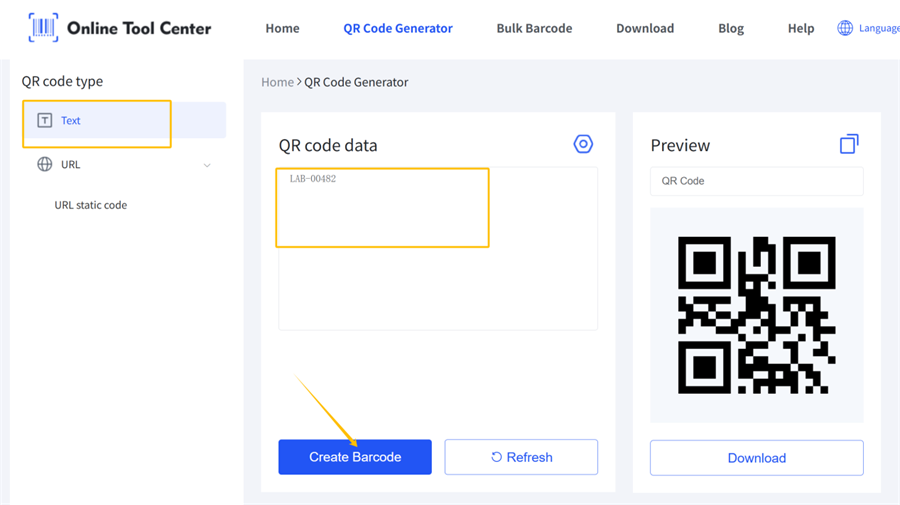
1. Enter Your Text
Open the OnlineToolCenter QR code generator and enter or paste the text you want to encode.
Your content could be a short instruction, product information, an asset number, or a brief message. Check the spelling, punctuation, line breaks, and special characters before generating the code.
2. Generate Your QR Code
Generate the QR code and preview the result. Depending on your needs, you can customize supported settings such as colors, size, and margins.
Keep the design readable. Adding decorative elements or reducing contrast too much can make a QR code harder to scan.
3. Download and Test It
Choose an appropriate image format and download your QR code. Scan it with a phone or QR code reader to confirm that the decoded text matches your original content.
If you plan to print the code on a label, package, or instruction sheet, test the printed version as well. A code that scans on a computer screen may not perform equally well after printing.
Can You Create a QR Code for Plain Text?
Yes. A plain-text QR code stores text directly in its encoded data. When scanned, it typically displays the text rather than automatically opening a webpage.
The right QR code type depends on what you want people to do:
• Plain-text QR code: Displays encoded information, such as a short instruction or reference number.
• URL QR code: Opens or offers to open a website.
• SMS QR code: Can open a messaging app with a phone number or message prefilled, depending on the code and device.
For short information that people need to read immediately, a plain-text QR code is often a straightforward option. For longer documents or information that may change, linking to a webpage is usually more practical.
How Much Text Can a QR Code Hold?
There is no single character limit. QR code data capacity depends on the version, encoding mode, and error correction level. At the upper limit, a Version 40 QR code with level L error correction holds up to 2,953 bytes in byte mode—not necessarily 2,953 characters.
Longer text may require more modules. At the same printed size, those modules become smaller and can be harder to scan.
For example, “Turn off the power before cleaning” is a good fit for a text QR code. A 20-page maintenance manual is better shared through a URL QR code.
For reliable results:
• Keep the text concise.
• Increase the printed size if the pattern becomes too dense.
• Test the final code at its intended size.
QR Code PNG vs. SVG: Which Format Should You Choose?
PNG and SVG are both useful QR code download formats, but they serve different purposes.
• PNG: A raster image suited to digital documents, presentations, and many everyday printing tasks. Enlarging a small PNG too much can make its edges appear blurry.
• SVG: A vector format that can scale to different sizes without the usual pixelation associated with enlarging raster images. It is useful for design layouts and print production when the software supports SVG.
OnlineToolCenter supports PNG, JPG, GIF, and SVG downloads for QR codes. Choose the format that fits your workflow, then check the final image at its intended size.
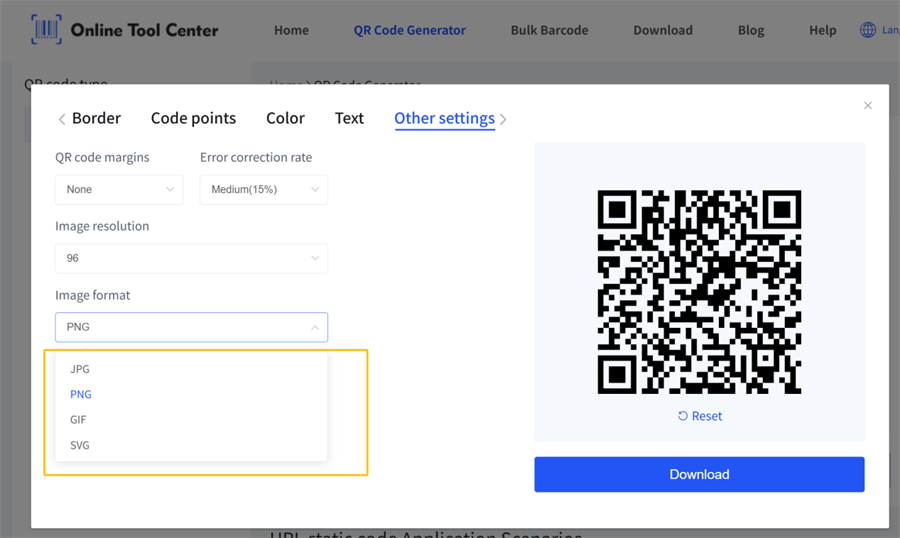
Remember that file format alone does not guarantee scan reliability. Contrast, quiet zones, module size, and print quality also matter.
How to Make Sure Your Text QR Code Scans
If a text QR code will not scan, check its size, contrast, margins, and print quality before generating it again.
Common issues include:
✔️ The pattern is too dense: Shorten the text or increase the QR code's physical size.
✔️ The code is blurry: Use a suitable image resolution and avoid enlarging a low-resolution image excessively.
✔️ The edges are cropped: Leave a clear margin at least four modules wide on all sides of the code.
✔️ A logo or decoration interferes with scanning: Reduce the covered area and test the result with the intended devices.
✔️ Special characters appear incorrectly: Check the original text and verify that the encoding and scanning software handle those characters correctly.
For printed codes, always test a physical sample before producing a large batch. Scanner performance depends on the code, the printing conditions, and the reading device.
Do Text QR Codes Expire, and Can You Edit Them?
A static QR code containing text directly does not inherently expire. The text is encoded in the pattern itself, so reading it does not depend on a hosted webpage or redirect service remaining available.
However, a printed QR code can become unreadable if it is damaged, faded, distorted, or poorly reproduced.
You also cannot directly edit the text inside an existing static QR code after printing. Changing the content requires generating a new QR code and replacing the printed one.
If the information needs frequent updates, consider using a QR code that points to an editable webpage or a dynamic QR code service. These approaches can allow the destination to change without replacing the printed pattern, but they may depend on the availability and terms of the service.
Frequently Asked Questions
Is a Text QR Code Free?
Yes, you can create one for free with OnlineToolCenter's text to QR code generator. The tool supports text-to-QR conversion and multiple image download formats. Check the available options on the generator page for your specific needs.
Can a Text QR Code Work Without Internet?
Generally, yes. When text is encoded directly in a QR code, a compatible scanner can decode and display it without an internet connection. Opening a website or accessing an online document, however, usually requires connectivity.
Create Your Text QR Code Online
Enter your text, generate the QR code, and download it in a suitable format with our free QR code generator. Before sharing or printing it, scan-test the final code to make sure the text is readable.

