




QR codes are now part of everyday life. You scan them to open menus, visit websites, connect to WiFi, read product information, or save contact details.
But not every QR code works the same way. One common type is the static QR code.
So, what is a static QR code? What does it mean? And when should you use one?
This guide explains the static QR code meaning, how it works, where it is useful, and what limitations you should know before creating one.
What Is a Static QR Code?
A static QR code is a QR code that stores fixed information directly inside the code pattern. Once it is created, the information cannot be changed.
For example, if you create a static QR code for this URL:
https://example.com/product-guide
that exact link is encoded into the QR code. When someone scans it, their phone reads the link and opens the page.
But if you later want the QR code to point to another URL, you cannot edit the same QR code. You need to create a new one.
That is the key static QR code meaning:
A static QR code is a fixed QR code for information that will not change.
It is simple, stable, and often free to create.
How Does a Static QR Code Work?
A static QR code works by converting your information into a scannable pattern.
The process is simple:
1.You enter your content, such as a URL, text, phone number, or WiFi details.
2.The QR code generator converts that content into a QR code.
3.You download the QR code image.
4.A user scans it with a phone camera.
5.The phone reads the fixed data inside the code.
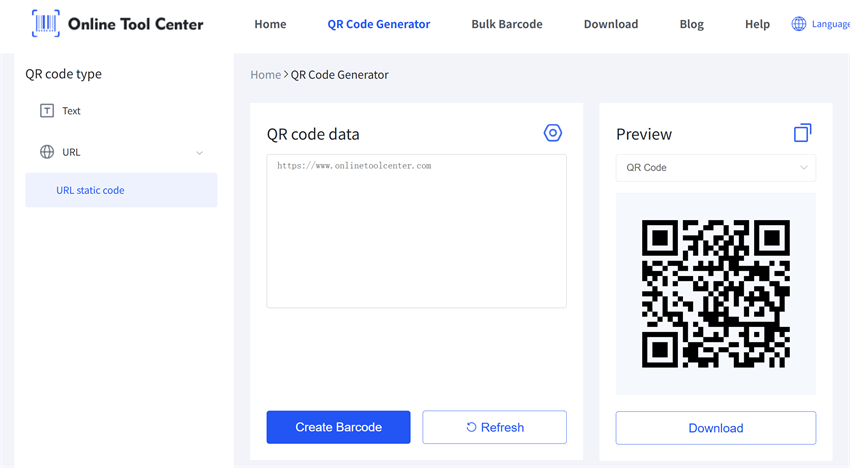
Unlike dynamic QR codes, static QR codes usually do not rely on a dashboard, redirect link, or tracking system. The information is built into the QR code itself.
This makes static QR codes a good choice for simple and long-term use.
What Can a Static QR Code Store?
A static QR code can store several types of fixed information, including:
• Website URL
• Plain text
• Phone number
• Email address
• SMS message
• Contact information
• WiFi network details
• A link to a PDF or online file
For example, a cafe can create a static QR code for WiFi access. A small business can add one to a business card. A brand can place one on product packaging to link to a user guide.
The best rule is simple:
If the information will stay the same, a static QR code usually works well.
Common Uses of Static QR Codes

Static QR codes are useful in many everyday and business scenarios.
1. Website Links
You can use a static QR code to send users to a fixed website, landing page, product page, or contact page.
This is common on flyers, posters, packaging, brochures, and business cards.
2. WiFi Sharing
A static QR code is ideal for WiFi access because the network name and password usually do not change often.
It is useful for cafes, hotels, offices, schools, co-working spaces, and home guest areas.
3. Business Cards
You can add a static QR code to a business card so people can quickly open your website, portfolio, or contact details.
4. Product Packaging
Brands can use static QR codes on packaging to link to product instructions, care guides, warranty pages, or user manuals.
5. Simple Documents or PDF Links
If a PDF link is stable, you can create a static QR code for it. This works well for manuals, class handouts, event guides, or product documents.
Pros of Static QR Codes
Static QR codes are popular because they are easy to create and easy to use.
Easy to Create
You do not need technical skills. Enter your content, generate the code, download it, and use it.
Often Free
A static QR code is usually free because it does not require ongoing editing, hosting, or scan tracking services.
No Account Needed
Many static QR code generators allow users to create and download codes without signing up.
Good for Fixed Information
If your content will not change, a static QR code can work for a long time.
Easy to Print
You can use static QR codes on labels, posters, packaging, flyers, cards, and signs.
Cons of Static QR Codes
Static QR codes are useful, but they are not suitable for every situation.
You Cannot Edit the Content
This is the biggest limitation. Once the QR code is created, the information is fixed.
If the link is wrong or the content changes, you must generate a new QR code.
Usually No Scan Tracking
Static QR codes usually do not show how many people scanned the code, where they scanned it, or what device they used.
If you need marketing analytics, a dynamic QR code is a better choice.
Not Ideal for Changing Campaigns
Avoid using static QR codes for information that changes often, such as:
• Seasonal promotions
• Event pages
• Restaurant menus with frequent updates
• Limited-time coupons
• Campaign landing pages
For these cases, dynamic QR codes are usually safer.
Static QR Code vs Dynamic QR Code
Many users search for static QR code because they want to compare it with a dynamic QR code.
Here is the simple difference:
Feature | Static QR Code | Dynamic QR Code |
Editable after creation | No | Yes |
Scan tracking | Usually no | Usually yes |
Best for | Fixed information | Changeable content |
Cost | Often free | Often paid |
Good for printing | Yes, if content is final | Yes, especially for campaigns |
Use a static QR code when your information will not change.
Use a dynamic QR code when you need to edit the destination later, track scans, or manage marketing campaigns.
When Should You Use a Static QR Code?
A static QR code is a good choice when you need a simple QR code for fixed information.
Use it for:
• A permanent website URL
• WiFi access
• Contact details
• Business cards
• Product instructions
• Stable PDF links
• Plain text
• Phone numbers or email addresses
Before creating one, ask yourself:
Will this information stay the same?
If yes, a static QR code is usually the right choice.
If no, consider using a dynamic QR code instead.
FAQ About Static QR Codes
What is a static QR code?
A static QR code is a QR code that stores fixed information directly in the code. Once created, it cannot be edited.
What is the static QR code meaning?
The static QR code meaning is simple: it is a fixed QR code for information that will not change, such as a URL, text, WiFi details, or contact information.
Are static QR codes free?
Static QR codes are often free to create. Some tools may charge for advanced design options, high-resolution downloads, or extra features.
Do static QR codes expire?
A static QR code itself usually does not expire. However, if it links to a webpage, PDF, or file that is deleted or moved, the QR code may stop working.
Can I edit a static QR code?
No. In most cases, you cannot edit a static QR code after creating it. You need to generate a new one if the content changes.
Can a static QR code track scans?
Usually no. Static QR codes generally do not provide scan analytics. For tracking, use a dynamic QR code.
Final Thoughts
A static QR code is simple, practical, and often free. It is a great choice when you want to share fixed information, such as a website link, WiFi details, contact information, or product guide.
But it has one major limitation: it cannot be edited after creation.
So before using one, remember this rule:
Use a static QR code when your content will stay the same. Use a dynamic QR code when your content may change.
Need a quick and simple way to create one? Use our free static QR code generator online to create and download a scannable QR code in seconds.

