



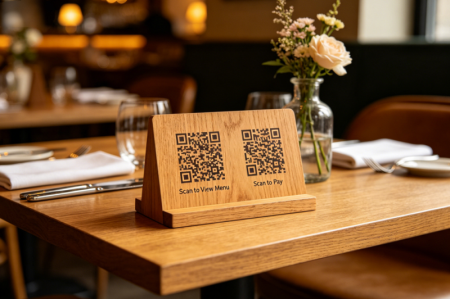
QR codes are now ubiquitous on menus, packaging, and business cards. However, a growing trend for brands seeking higher engagement is the double QR code layout. Instead of relying on one link for everything, businesses are placing two QR codes side by side to guide users toward distinct actions simultaneously.
In this guide, we'll explore the strategic value of double QR codes, real-world business scenarios, and the technical design rules that prevent scanning friction.
What Are Double QR Codes?
Despite the technical-sounding name, double QR codes are not a new format or proprietary technology. They are simply two independent QR codes—each with a unique destination—integrated into one visual design.
Think of it as providing two clear doors for your customers. A single QR code says, “Scan here.” Double QR codes say, “Choose the path that fits your current need.” This reduces user friction by allowing them to skip landing pages and go directly to the service they require.
Why Should You Use Two QR Codes Instead of One?
Using two QR codes is most effective when your audience has two distinct, high-priority intentions. Below is a strategic breakdown by industry:
Industry | QR Code 1 (Primary Action) | QR Code 2 (Secondary / Retention) |
Restaurants | Digital Menu | Online Ordering / Payment |
Retail & E-commerce | Product Details / Ingredients | Discount Coupon / Loyalty Sign-up |
Events | Registration / Tickets | Venue Map / Schedule |
Business Cards | Portfolio / Company Website | vCard / Contact Save / LinkedIn |
Product Packaging | User Manual / Setup Video | Warranty Registration / Support |
Hotels & Hospitality | Wi-Fi Instant Access | Feedback Form / Local Guide |
Real Estate | Property Listing / Virtual Tour | Contact Agent via WhatsApp |
Real-World Examples of Double QR Codes
1. Maximizing Business Card Utility
A business card has limited physical space. Instead of crowding it with social media handles and URLs, use two QR codes to create a lead-generation tool:
Code 1: Directs to your digital portfolio or website.
Code 2: A vCard or Calendly link, allowing prospects to save your contact info or book a meeting in seconds.
2. Enhancing Product Packaging
Packaging design must be clean but informative. Double QR codes allow brands to separate pre-purchase info from post-purchase support:
The "Discovery" Code: Focuses on transparency (sourcing, ingredients, or brand story).
The "Utility" Code: Focuses on customer success (setup guides, warranty registration, or reordering).
3. Optimizing Restaurant Operations
At the table, double QR codes reduce the workload on staff:
Code 1: "Scan to View Menu."
Code 2: "Scan to Pay" or "Join Rewards."
By labeling these clearly, you cater to the customer's immediate need without forcing them through multiple clicks on a slow landing page.
How to Design Double QR Codes for Better Scanability
Placing two QR codes in close proximity requires strict adherence to technical design rules to prevent "cross-scanning" or device confusion.
1. Protect the "Quiet Zone"
Every QR code requires a "Quiet Zone"—the blank buffer space surrounding it. Never let two QR codes touch. If they are too close, the smartphone camera may struggle to lock onto the correct pattern. Aim for a gap at least 1/2 the width of the QR code itself.
2. Action-Oriented Labels (CTAs)
A "naked" QR code creates hesitation. For double layouts, clear labels are non-negotiable. Use short, verb-based CTAs:
“Scan for Menu” vs. “Leave a Review”
“Get the App” vs. “Contact Support”
3. High Contrast
QR codes need strong contrast to scan reliably.
To ensure reliable decoding across all devices and lighting conditions, adhere to these color standards:
• Best Practice: Use a dark pattern on a light background.
• Recommended Pairs: Black on white (classic), dark blue on white, or deep green on cream.
• Combinations to Avoid: Light gray or yellow on white, and pastels over busy backgrounds.
4. Brand Consistency
Double QR codes should maintain consistent visual design while keeping each code distinguishable. Standardize these elements:
• Size
• Frame style
• Color palette
• Label format
• Icon style
• Spacing
Use small icons or clear labels to differentiate codes:
• Globe icon for website
• Phone icon for vCard
• Gift icon for coupon
• Map pin icon for directions
• Star icon for reviews
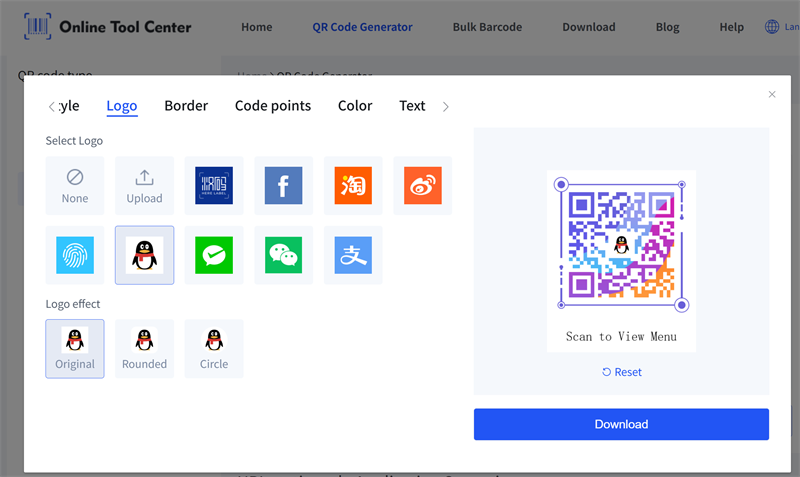
It is recommended to use a professional or custom QR code generator to create two separate QR codes with matching colors, frames, labels, and logos.
Maintaining QR code design consistency improves usability, reinforces brand recognition, and integrates double QR codes seamlessly into your visual identity.

4. Export for Quality
Low-resolution QR codes are risky, especially for print.
For digital use, a high-resolution PNG may be enough. For printed materials such as posters, packaging, menus, business cards, or product labels, SVG is usually better because it is a vector format and stays sharp at different sizes.
5. Test Before Publishing or Printing
Never print thousands of flyers, cards, or packages without testing both QR codes first.
Test with:
• iPhone and Android devices
• Different camera apps
• Different lighting conditions
• Different scan distances
• Printed samples, not just screen previews
Also check whether each QR code opens the correct destination. This may sound obvious, but mistakes happen.
You do not want a “Scan for Coupon” code opening a warranty page. That would be awkward.
FAQs About Double QR Codes
1. What are double QR codes and how do they work?
Double QR codes are two separate QR codes placed together in one design layout. Each code usually leads to a different destination or action, such as a menu, coupon, website, contact card, map, or support page. They allow users to take two distinct actions quickly and efficiently.
2. Can I put two QR codes next to each other, and how should I design them?
Yes. Two QR codes can be placed side by side as long as they have enough spacing, clear labels, strong contrast, and proper quiet zones. Maintaining visual consistency and using small icons or descriptive labels helps users easily distinguish each code.
3. Should I use static or dynamic QR codes, and can they be customized?
Use static QR codes for permanent information, like Wi-Fi access or a vCard. Use dynamic QR codes for campaigns, coupons, or links that may change over time. Both QR codes can be customized with logos, colors, frames, and icons, but ensure logos are not too large and contrast is sufficient for reliable scanning.
4. What common mistakes should I avoid when using double QR codes?
The main mistakes are poor clarity, placing codes too close together, omitting labels, making codes too small, or creating visually confusing layouts. Testing both codes before publishing and ensuring proper spacing, labels, and contrast are key to preventing scanning errors.
Final Thoughts
Double QR codes are a powerful way to enhance user autonomy. By providing clear, labeled choices, you reduce friction and increase engagement. The key to success lies in clarity and spacing: if a user can understand the purpose of both codes within two seconds, your design is optimized for conversion.
