




Tracking attendance manually is time-consuming, error-prone, and difficult to scale. Whether you're managing a classroom, event, workplace, or training session, using a QR code attendance system offers a faster and more reliable solution.
By learning how to generate a QR code for attendance, you can automate check-ins, reduce paperwork, and collect accurate data in real time.
Quick Answer
To generate a QR code for attendance, create a QR code that links to a digital check-in form, spreadsheet, or attendance system. When users scan the code, they can submit their presence instantly using their mobile device.
What Is a QR Code Attendance System?
A QR code attendance system uses a scannable QR code to record attendance digitally. Instead of signing paper sheets, users scan a code and submit their details through a form or system.
Typically, the workflow looks like this:
Step 1: Scan QR Code
Step 2: Open Form/Page
Step 3: Submit Details
Step 4: Record Attendance
This method is widely used in schools, offices, events, and training programs.
Why Use QR Codes for Attendance Tracking
1. Faster Check-In Process
Users can check in within seconds using their smartphones.
2. Accurate Data Collection
Eliminates handwriting errors and duplicate entries.
3. Contactless and Convenient
No physical contact or shared materials required.
4. Real-Time Tracking
Attendance data can be updated instantly in a database or spreadsheet.
5. Easy to Scale
Works for small meetings or large events with hundreds of participants.
Common Use Cases of QR Codes for Attendance
Education
• Classroom attendance
• Student check-ins
• Workshops and seminars
Events and Conferences
• Event registration check-in
• Session attendance tracking
• Visitor logging
Workplace and HR
• Employee attendance
• Training sessions
• Visitor management
Fitness and Membership Programs
• Gym check-ins
• Class attendance tracking
How to Generate QR Code for Attendance (Step-by-Step)
Step 1: Create Your Attendance Form or System
You can choose from several tools to build your attendance system. Here is a quick comparison:
To collect attendance data, you first need a digital form or system where users can submit their information.
Tool Type | Recommended Tools | Best Use Case | Difficulty |
Basic Forms | Google Forms / Microsoft Forms | Classes, small events, quick setup | Easy |
Structured Data | Airtable / Notion | Team tracking, structured databases | Medium |
Advanced Systems | Dedicated attendance apps | Enterprises, gyms, membership systems | Advanced |
Offline Solutions | Excel + QR scanner tools | Low connectivity environments | Medium |
Your form should collect:
✔️Name
✔️ID or email
✔️Date/time (auto-recorded if possible)
Tip: Keep the form short to reduce check-in time and improve participation.
Step 2: Copy the Form Link
Once your form is ready, copy its URL.
Make sure the link:
• Works without login (unless required)
• Is mobile-friendly
• Loads quickly
Step 3: Generate the QR Code
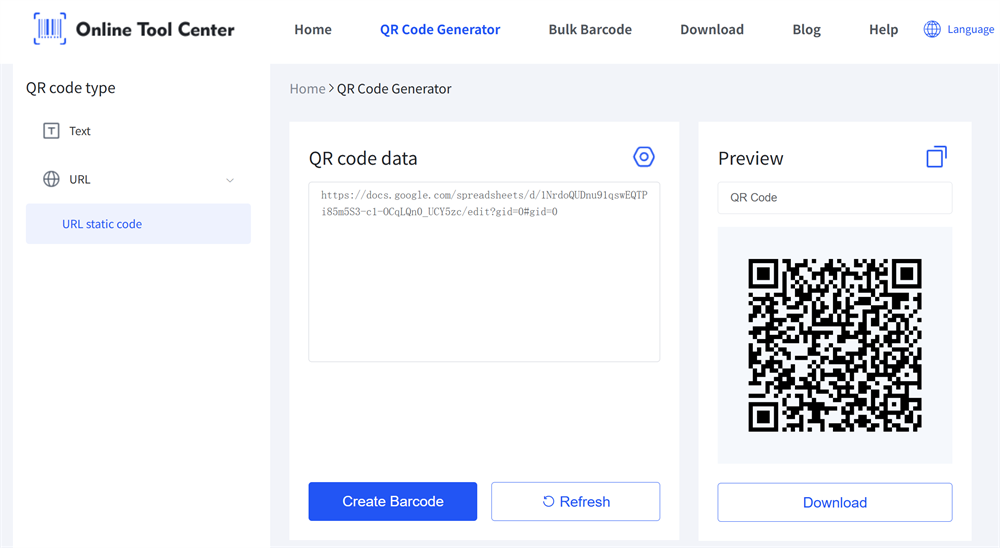
Use a reliable free QR code generator for attendance
• Paste your form URL
• Generate the QR code
• Download the image
Tip:Use a dynamic QR code (URL-based) so you can update the form later without changing the printed code.
Step 4: Test the Full Attendance Workflow
Before going live, test the entire attendance workflow end to end.
• Scan QR codes with different devices
• Ensure the form loads quickly
• Check submission flow
Step 5: Display the QR Code
Place the QR code where users can easily scan it:
• Entrance areas
• Screens or posters
• Printed signage
Best Practices for QR Code Attendance Tracking
Keep It Simple
Use a short and clean form to reduce friction.
Optimize for Mobile
Ensure the form works well on smartphones.
Use One QR Code per Session (Optional)
For better tracking, create unique QR codes for different sessions or days.
Add Time Restrictions
Limit submissions to specific time windows if needed.
Monitor Submissions
Track responses in real time to identify issues quickly.
Common Mistakes to Avoid
• Using overly complex forms
• Not testing the QR code before deployment
• Poor placement (hard to scan)
• Slow-loading pages
• Allowing unlimited or duplicate submissions
These issues can reduce accuracy and user participation.
Final Thoughts
Learning how to generate a QR code for attendance is one of the easiest ways to modernize attendance tracking. It replaces manual processes with a fast, scalable, and reliable system.
By combining a QR code generator for attendance with a simple digital form, you can create an efficient attendance workflow for classrooms, events, or businesses.
FAQ Section
Q1: How do I generate a QR code for attendance for free?
You can use a free QR code generator to create a code linked to a Google Form or attendance page.
Q2: What is the best QR code generator for attendance tracking?
Any reliable QR code generator that supports URL-based codes works well, especially when combined with a form or database.
Q3: Can QR codes track attendance automatically?
Yes, when linked to a form or system that records submissions, attendance can be tracked automatically.
Q4: Do I need an app for QR code attendance?
No. Most smartphones can scan QR codes using the built-in camera.
Q5: How do I prevent duplicate attendance entries?
Use form settings such as required login, unique identifiers, or timestamp validation.
