




QR code styling lets you replace the standard black-and-white look with brand colors, custom data dots, finder eyes, a logo, and a frame. Done carefully, a custom QR code design can look distinctive and scan just as quickly as a plain code. Done badly, it becomes decoration that fails at the exact moment someone needs it.
The rule is simple: style around the QR code's structure, not against it. OnlineToolCenter's free QR code generator gives you the controls to create, test, and download a styled static QR code without installing design software.
What Is QR Code Styling, and What Can You Change?
QR code styling changes a code's appearance without changing the data encoded inside it. A URL remains the same URL whether its modules are square, rounded, or dotted.
You can customize several visual elements:
• Foreground and background colors
• Data dots, also called modules or code points
• The three finder eyes in the corners
• A centered logo
• Borders, frames, and call-to-action text
• Margins, image resolution, and export format
These controls affect presentation, not purpose. Styling a URL code does not turn it into a Wi-Fi code, vCard, or dynamic QR code. The encoded content and the visual treatment are separate decisions.
Which QR Code Styles Can You Create?
Choose a style that fits the placement, not merely the brand mood. The most elaborate option is rarely the most useful.
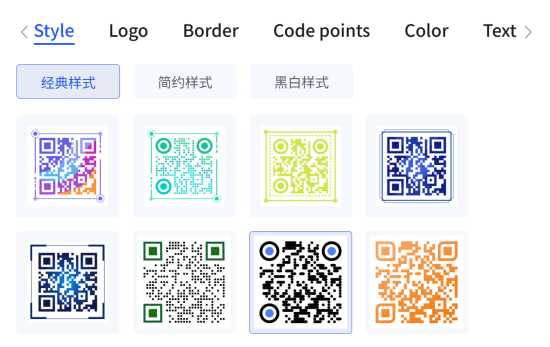
• Classic square: Crisp square modules offer the safest choice for small labels, documents, and general business use.
• Rounded: Soft corners suit modern packaging, hospitality, beauty, and lifestyle brands without radically changing the grid.
• Dot: Circular data dots create a lighter visual texture. See how to build custom QR code dots.
• Branded: A controlled brand color and centered logo connect the code with a company, product, or campaign.
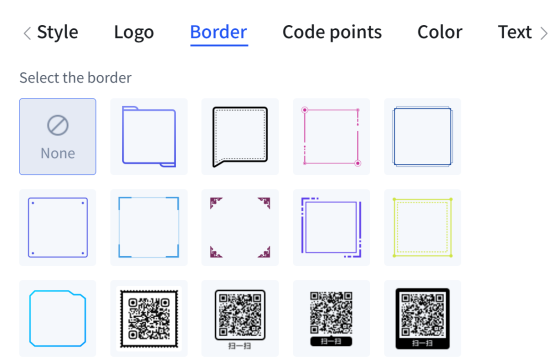
• Framed: A border plus a clear prompt—“Scan for the menu” or “Scan for setup”—explains what happens next. Explore QR code frame options.
• Gradient: Gradients can work on digital graphics, but uneven contrast makes them less forgiving than a solid dark foreground.
Decorative outer artwork is also possible, provided the functional code remains square and unobstructed. For more ideas, see the guide to creating a unique QR code shape.
How Do You Style a QR Code for Free?
OnlineToolCenter keeps the workflow short. You can create and download a custom QR code design directly in the browser or on your smartphone.
1. Open the free QR code generator.
2. Enter the destination URL or text you want to encode.
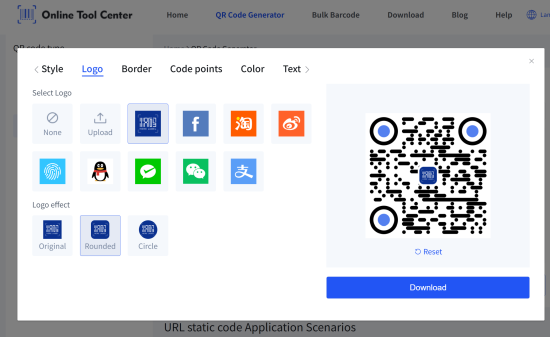
3. Add a logo, then choose an original, rounded, or circular logo treatment.
4. Select a border, data-dot style, and finder-eye style.
5. Adjust the foreground, eye, background, and text colors. Solid and gradient options are available.
6. Generate the code, scan the final preview, then download it as GIF, JPG, PNG, or SVG.
Do not treat the preview as proof. Download the actual file and test that version. If you plan to print it, test a physical sample at its final size.
How Do You Keep a Styled QR Code Scannable?
A scannable QR code needs clear geometry and contrast. Branding comes second.
✔️ Use dark modules on a light, plain background. Black on white remains the strongest baseline.
✔️ Keep an empty quiet zone around all four sides. QR Code guidance uses a minimum width of four modules
✔️ Protect the three finder eyes. Heavy distortion makes the symbol harder for a camera or scanner to locate.
✔️ Keep the logo centered and modest. Never cover a finder eye.
✔️ Avoid transparent backgrounds, busy photographs, folds, glare, and low-contrast color pairs.
✔️ Scale the image evenly. Stretching only the width or height breaks the square module grid.
✔️ Use stronger error correction when adding a logo, but do not mistake error correction for design permission.
✔️ Test with several iOS and Android phones, different camera angles, and the expected scanning distance.
A styled QR code can still scan well, but every visual change leaves less room for error. Keep a clear border around the code, make the three corner eyes easy to recognize, and avoid using an oversized logo.
Error correction can recover some missing information, but it is not a free pass—a 30% recovery level does not mean the logo can cover 30% of the QR code. GS1 recommends leaving a quiet zone at least four modules wide.
Should You Use a Static or Dynamic QR Code for Custom Design?
Styling controls appearance. Static versus dynamic controls how the destination behaves.
A static QR code stores the final URL or text directly. It suits permanent destinations, simple downloads, and projects that do not require scan analytics. OnlineToolCenter generates static URL codes.
A dynamic QR code usually stores a managed redirect. Its service provider may let you change the destination, track scans, or manage a long campaign. That flexibility often depends on an account or paid plan. Pick the code type first; apply the visual style afterward.
Which QR Code Style Works Best for Your Use Case?
Match the style to viewing distance, surface, and user expectation.
Use case | Practical QR code style |
Business cards | Simple brand color, small centered logo, generous margin, short CTA |
Product packaging | High contrast, protected quiet zone, restrained styling, scalable SVG |
Restaurant menus and table signs | Larger code, bold frame, specific CTA such as “Scan for menu” |
Posters and flyers | Large code, strong contrast, minimal detail, testing from the intended distance |
Social posts and digital graphics | More color freedom, clean background, testing on several screen sizes |
Business cards leave little room for error, so simplify. Posters create the opposite problem: viewers scan from farther away. Increase the code size instead of adding finer detail. Packaging adds glare, curves, and print variation, which reward conservative QR code styling.
Which File Format Should You Download?
Use SVG for packaging, print layouts, signs, and any design that may be resized. Vector edges stay sharp at different dimensions. PNG works well for websites, email, social media, and presentation slides when exported at the required size.
Choose JPG only when another platform requires it; compression can soften module edges. GIF serves specialized digital workflows but offers little advantage for a normal static QR code. Never enlarge a small screenshot for print. Generate a fresh SVG or higher-resolution raster file instead.
The best QR code style is not the most decorative one. It matches the brand, tells people why to scan, and works immediately in its final setting. Keep the structure clean, test the downloaded result, and adjust anything that slows recognition.

