




Most equipment inspections still rely on paper forms or Excel sheets. The same problems appear again and again: the wrong machine is checked, the wrong form is used, records go missing, and it is hard to prove an inspection actually took place. When an audit arrives, someone has to search through folders or shared drives for incomplete notes.
A QR code linked to each equipment's inspection checklist changes this. One scan opens the correct checklist for that specific asset. The technician completes the inspection, adds photos if needed, and the record is saved. The process becomes digital, standardized, and easy to trace.
Benefits of QR Code Equipment Inspection
The main improvements come from removing everyday friction.
Technicians no longer spend time looking for the right form or confirming which machine they are standing in front of. Mistakes decrease because the checklist is tied directly to the asset. Photos and timestamps make it harder to complete an inspection without being present. When auditors request records, the information is already organized and easy to retrieve.
Many teams find that inspections finish faster and the quality of records improves. Compliance work becomes simpler because the evidence is clear and consistent.
How to Set Up QR Code Equipment Inspection
You can put a working system in place without complex software. Follow these steps:
1. Prepare a list of your equipment. Include a unique ID, name, and location for each asset.
2. Create an inspection checklist for each piece of equipment (or each type of equipment) and get its unique URL. This can be a Google Form, an internal web page, or any online checklist.
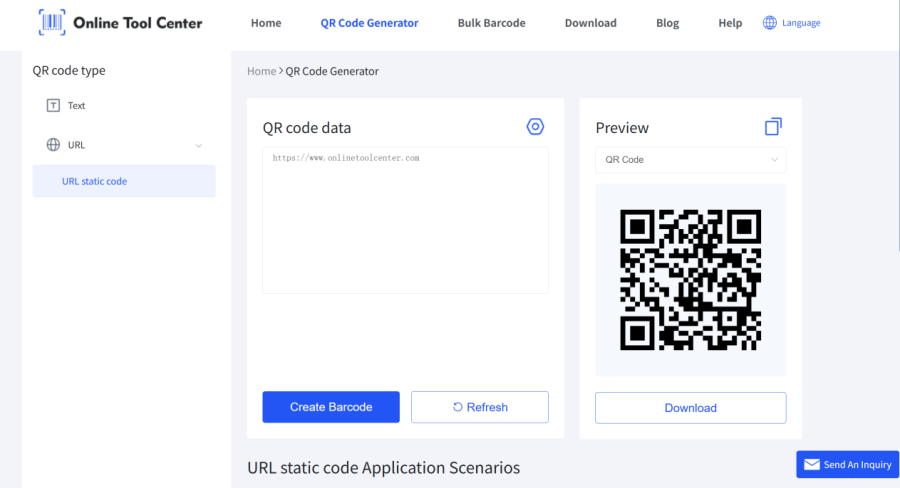
3. Generate a QR code for each checklist URL. Some online QR code generator that supports bulk creation makes this fast. Upload the list of URLs and create the codes in minutes. You can also customize the design with your colors or logo so the labels look professional.
4. Print the QR codes on durable labels and attach each one to the matching piece of equipment in a place that is easy to scan.
5. Start using the system. Technicians open their phone camera, scan the code on the equipment, complete the checklist that opens, and submit. The record is saved with the time and any photos they added.
This approach keeps the process simple. The online generator handles bulk creation and design, so you spend less time making codes and more time getting the labels onto the machines.
Practical Tips for QR Code Equipment Inspection
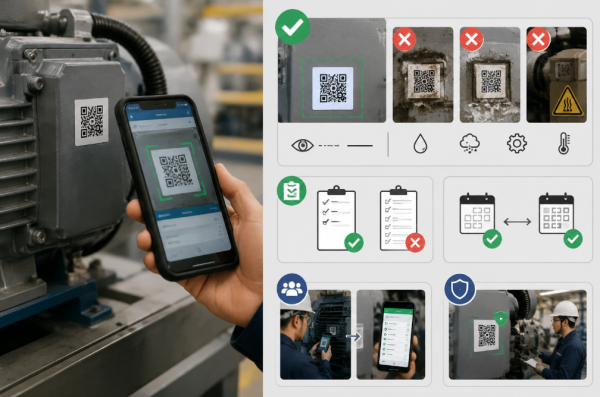
• Place labels at eye level or slightly below on a clean, flat surface where technicians can scan without climbing or moving parts. Avoid oil, dust, water, moving guards, and high-heat areas. For outdoor or harsh conditions, use a thermal transfer printer to create weather-resistant labels.
• Keep checklists short and focused on critical safety and performance items only. Long forms slow people down and reduce completion quality. Create separate checklists for different inspection frequencies instead of one large form.
• Test with a small group of assets first. Have real technicians scan and complete inspections during normal shifts. Confirm the correct form opens every time, labels stay readable, and the process feels faster than paper before expanding.
• Treat labels as permanent parts of the equipment. Remind staff not to cover or remove them during cleaning or maintenance. Include a quick visual check of the labels in regular rounds.
Start Your QR Code Equipment Inspection System
QR codes turn equipment inspections into a straightforward scan-and-complete process. You reduce common errors, create reliable records, and make audits less stressful.
Create your first set of QR codes now. Prepare the checklist URLs, generate the codes, print the labels, and run a small pilot. You can have the system working the same day.

