




A QR code by itself only shows a pattern. It does not explain the purpose behind the scan. Adding a frame changes that. A message like "Scan for Menu" or "Get Your Discount" gives users a clear reason to interact.
Today, QR codes appear on packaging, restaurant menus, posters, and marketing materials. A well-designed QR code with frame helps the code feel like part of the overall design instead of an isolated black-and-white graphic.
What Is a QR Code Frame?
A QR code frame is a decorative border or surrounding design area placed around a QR code. It can include colors, shapes, icons, or a short call-to-action (CTA) message while keeping the QR code itself readable.
Unlike a standard QR code that appears as a simple black-and-white pattern, a QR code with frame provides additional visual guidance. The frame tells users what action to take and helps the QR code fit naturally into a larger design.
Common elements in a QR code frame include:
• Border shapes or decorative edges
• CTA text such as "Scan Me" or "Learn More"
• Brand colors
• Logos or visual elements
• Background designs
For example, a restaurant may use a QR code frame with "Scan for Menu," while a product package may use "Scan to Learn More" to guide customers toward digital content.
The goal of a frame is not to make the QR code more complicated. A good QR code frame simply helps users notice it and understand its purpose.
Why Add a Frame to a QR Code?
A QR code works only when people notice it and know why they should scan it. A frame helps solve both problems.
Make QR Codes More Noticeable
A plain QR code can easily blend into packaging, posters, or printed materials. A QR code border creates visual separation and draws attention to the scanning area.
This is especially useful in crowded environments, such as retail shelves, event posters, or product labels.
Add a Clear Call to Action
Many people see QR codes but do not know what happens after scanning.
A frame can answer that question immediately.
Examples:
• Scan for Menu
• Get 10% Off
• Watch Video
• Product Details
• Join Now
A clear message reduces hesitation and encourages interaction.
Strengthen Brand Design
Businesses often use QR codes as part of a larger customer experience. A branded QR code with border can match the style of:
• Product packaging
• Promotional materials
• Store displays
• Business cards
• Digital campaigns
Instead of looking like a separate technical element, the QR code becomes part of the overall design.
Improve User Confidence
A QR code frame can also make the purpose of a code clearer. When users see a label such as “Scan to Verify Authenticity” or “Scan for Instructions,” they understand the value before taking action.
How to Add a Frame to a QR Code?
Adding a frame to a QR code is simple with the right tool. Our free QR code generator includes multiple ready-to-use frame templates, logo insertion, and full color customization — so you can create a branded, scan-ready QR code in just a few clicks.
Here's how to do it:
Step 1: Create Your QR Code
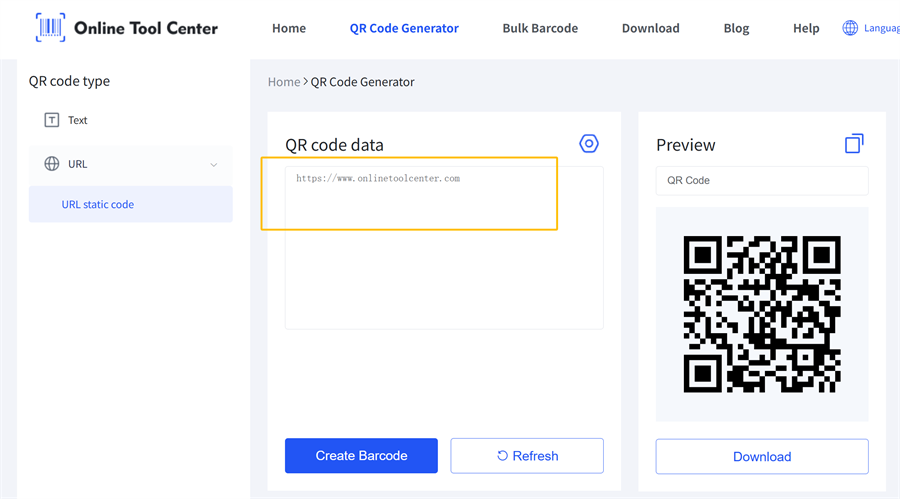
Start by generating a QR code based on the content you want to share.
Common options include:
• Website URLs
• Product pages
• Digital menus
• Contact information
• Social media profiles
• Promotional landing pages
The QR code should lead to content that provides real value to users.
Step 2: Choose a QR Code Frame Style
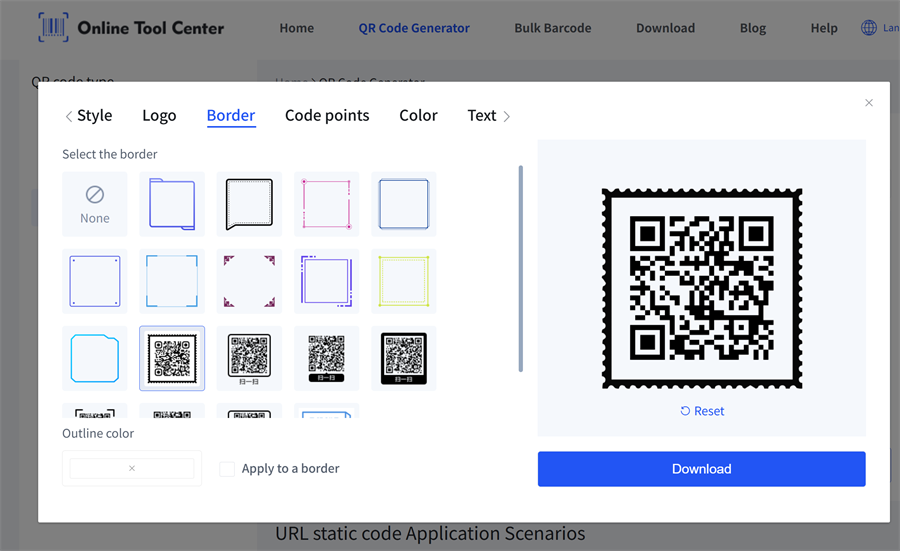
Select a frame style that matches your purpose.
Common options include:
• Simple borders
• Rounded frames
• Decorative frames
• CTA-based frames
For business use, a simple frame with clear text usually works better than an overly complex design.
Step 3: Customize the Frame
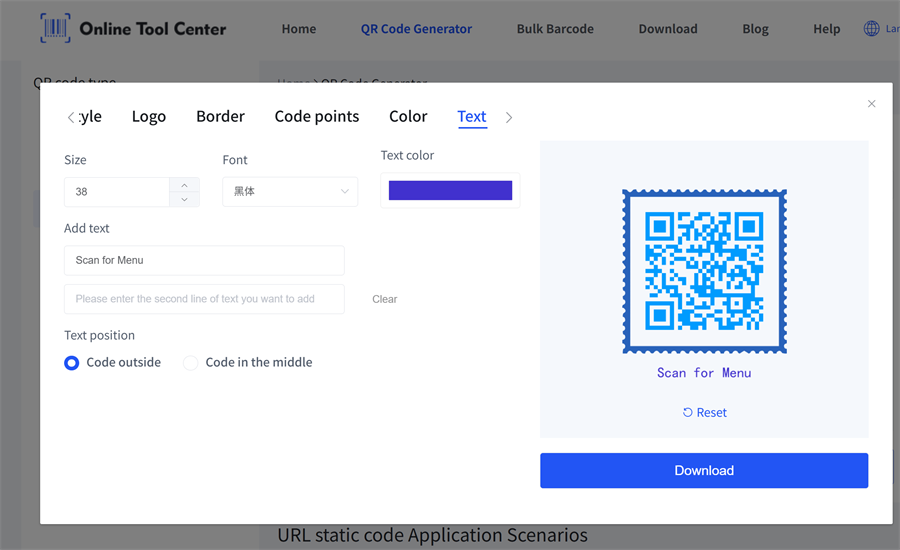
A QR code frame can often be adjusted with:
• Brand colors
• Text labels
• Shapes
• Visual elements
For example, a restaurant may choose a frame saying "Scan for Menu," while an online store may use "Shop Now."
The message should match the user's next step.
Step 4: Test Before Publishing
 Before printing or sharing your QR code, test it on different devices.
Check:
• Smartphone scanning speed
• Print quality
• Size and placement
• Background contrast
A QR code should remain easy to scan in the actual environment where customers will see it.
Ready to create yours?

Design a framed, branded QR code with our free generator — customize colors, add your logo, and test it instantly.
QR Code Frame Examples for Different Uses
A QR code frame can be used in many situations, but the best designs usually start with a clear customer action.
Product Packaging
Brands often add QR code frames to packaging to connect customers with digital content.
Examples:
• Scan for product details
• View instructions
• Verify authenticity
• Learn about ingredients
A framed QR code helps the package continue the customer experience after purchase.
Restaurants and Cafes
QR code menus are now common in restaurants.
A frame with a message like "Scan for Menu" or "View Today's Specials" makes the purpose immediately clear and improves usability.
Marketing Materials
Businesses use QR code frames on:
✔️ Flyers
✔️ Posters
✔️ Brochures
✔️ Event displays
A CTA-focused frame can turn printed materials into a direct path to online content.
Events and Tickets
Event organizers can use framed QR codes for:
✔️ Check-in
✔️ Registration
✔️ Schedule information
✔️ Digital tickets
The frame helps attendees quickly understand what to do.
Common QR Code Frame Mistakes
A QR code frame should improve usability, not distract from it.
Common mistakes include:
Overly Complex Designs
Too many decorative elements can make the QR code harder to notice.
Weak Contrast
Low contrast between the QR code, frame, and background may affect readability.
Unclear Messages
A frame without a clear purpose does little to encourage scanning.
Covering the QR Code Area
Design elements should stay outside the QR code pattern to avoid scanning problems.
FAQ
What is a QR code frame?
A QR code frame is a decorative border or design element added around a QR code to improve visibility, add branding, and guide users to scan.
How do I add a frame to a QR code?
You can add a frame by using a QR code generator that supports customization. Choose a frame style, add CTA text or branding elements, and test the final QR code before use.
Does a QR code frame affect scanning?
A properly designed QR code frame should not affect scanning. The QR code should remain clear, readable, and properly separated from surrounding design elements.
Can I create a branded QR code with a border?
Yes. Many QR code generators allow users to customize borders, colors, logos, and CTA messages to create branded QR codes for marketing and business applications.
Final Thoughts
A QR code frame is a simple design upgrade that helps connect physical materials with digital experiences. Whether used on packaging, menus, posters, or promotional materials, the right frame can make a QR code easier to notice and more meaningful to users.
The best QR code frame is not the most decorative one. It is the one that clearly tells people what to do next.
