



Libre Barcode 39 is a free, open-source barcode font for displaying data as a code 39 barcode. It is commonly used to create asset tags, inventory labels, library labels, equipment IDs and other short alphanumeric barcodes in Excel, Word and Google Sheets.
The font is easy to use, but selecting the right version matters. Standard Libre Barcode 39 is suitable for uppercase letters and numbers, while its Extended variants support lowercase letters and additional ASCII characters.
This guide explains what the font does, where to download it safely and how to choose among the four Libre Barcode 39 variants.
What Is Libre Barcode 39?
Libre Barcode 39 is a font implementation of Code 39, also known as Code 3 of 9. When supported data is displayed in this font, the characters appear as barcode bars and spaces.
Standard Code 39 can encode:
• Uppercase letters A–Z
• Digits 0–9
• Space
• Hyphen and period
• Dollar sign, slash, plus sign and percent sign
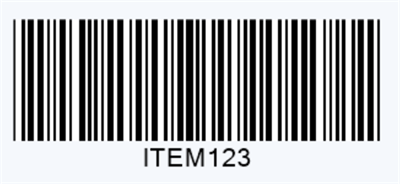
An asterisk is used as the start and stop character. For example, the value ITEM123 must normally be entered as *ITEM123* before the font is applied.
Without these delimiters, a barcode may look plausible but fail to scan.
Libre Barcode 39 is useful because it can turn ordinary spreadsheet data into barcodes without requiring dedicated label software. However, it remains a font rather than a full barcode verification system. It does not automatically validate the data, control print dimensions or confirm scanner compatibility.
Is Libre Barcode 39 Free?
Yes. Libre Barcode fonts are licensed under the SIL Open Font License, according to the official Libre Barcode project repository. This permits broad personal and commercial use subject to the license terms.
The safest place to obtain a Libre Barcode 39 free download is Google Fonts or the official project repository. Using an official source reduces the risk of downloading an outdated, modified or incorrectly packaged font file.
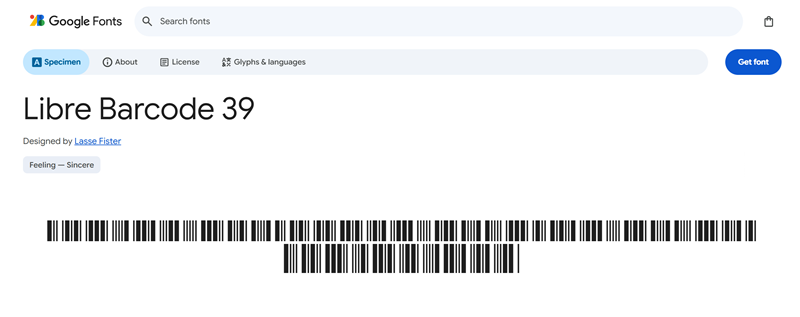
For Microsoft Excel and Word, download and install the .ttf file on the computer. Google Sheets users can usually add Libre Barcode fonts directly through the More fonts menu without downloading a local file.
Which Libre Barcode 39 Font Should You Choose?
The Libre Barcode project includes four Code 39 font variants.
Font | Character support | Readable text below |
Libre Barcode 39 | Standard Code 39 | No |
Libre Barcode 39 Text | Standard Code 39 | Yes |
Libre Barcode 39 Extended | Full ASCII input | No |
Libre Barcode 39 Extended Text | Full ASCII input | Yes |
Libre Barcode 39
Choose this version when you need only the barcode bars and your data contains uppercase letters, numbers or standard Code 39 symbols.
It works well for short internal identifiers such as ASSET-105, BIN42 or ROOM-08.
Libre Barcode 39 Text
This version adds human-readable text below the barcode. It is often the most practical choice for inventory and asset labels because employees can still read or enter the identifier when a scanner is unavailable.
Libre Barcode 39 Extended
Libre Barcode 39 Extended supports lowercase letters and additional ASCII characters. Use it only when the original data cannot be converted to the standard Code 39 character set.
Extended characters are represented through combinations of standard Code 39 characters. This can make the barcode longer than expected.
Libre Barcode 39 Extended Text
This option combines Full ASCII support with readable text below the bars. It is useful when the data contains lowercase letters or extra symbols and the printed value must remain visible.
The scanner may need Full ASCII or Extended Code 39 enabled. Otherwise, it can return the underlying character combinations instead of the intended data. The official Code 39 documentation explains this encoding behavior.
Libre Barcode 39 or an Online Barcode Generator?
Use a barcode font when barcodes need to remain connected to spreadsheet cells. Use an online generator when you need a portable barcode image.
Requirement | Better choice |
Create barcodes from an Excel column | Libre Barcode 39 |
Show readable data below the bars | Libre Barcode 39 Text |
Download a PNG or SVG barcode | Online generator |
Insert one barcode into several documents | Online generator |
Share barcodes with computers that may not have the font | Online generator |
Maintain a reusable spreadsheet workflow | Barcode font |
Font-based barcodes depend on correct font rendering. If a document is opened on another computer, converted to PDF or transferred into design software, the output can change when the font is not preserved.
An online Code 39 barcode generator produces a standalone image, making it more convenient for websites, label layouts, product documentation and files shared across different systems.

Final Choice
Libre Barcode 39 is a practical free font for short uppercase asset numbers, inventory codes and internal identifiers. Choose the Text version when people must also read the value. Select an Extended version only when lowercase letters or additional ASCII characters are essential.
If you need to create barcodes in a spreadsheet, continue with our guide to using Libre Barcode 39 in Excel and Google Sheets. If you need a downloadable image instead, use an online Code 39 barcode generator.
