



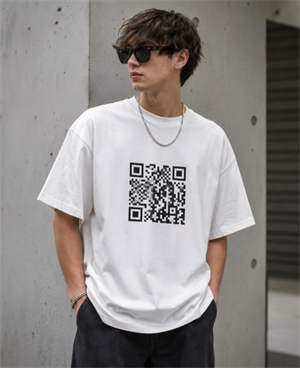
From viral "Scan to buy me a beer" T-shirts at music festivals to sleek, digital care labels on high-end boutique apparel, QR codes on clothing have evolved from a passing tech novelty into a highly practical tool.
Whether you are designing a custom graphic tee for a social event, creating unique merch for your community, or launching a clothing line that bridges the gap between physical retail and your online storefront, you need your printed codes to work reliably.
This guide introduces creative ways to use QR codes on apparel, where to place them for the best scan rates, and the technical printing rules you must follow to ensure they scan consistently.
Creative Ideas: What Can You Link a Clothing QR Code To?
The magic of a QR code on fabric is that it turns a static piece of clothing into an interactive gateway. Depending on your goals, the destination of your scan can range from lighthearted fun to highly converting e-commerce landing pages.
For Individuals: Fun, Social, and Meme Shirts
If you are designing custom apparel for yourself, a group of friends, or a community event, you can use QR codes to spark real-world engagement:
• Social Media & Digital Portfolios: Instead of spelling out your handle, print a QR code on your sleeve or chest linking directly to your Linktree, Instagram, TikTok, or digital design portfolio. It is an excellent icebreaker at networking events or conventions.
• The "Buy Me a Drink" Trend: A highly popular custom gift idea involves printing a QR code on a shirt that links to your Venmo, Cash App, or PayPal. It is a favorite for birthday trips, bachelor/bachelorette parties, and festivals.
• Interactive Jokes & Memes: Want to surprise people? Link your shirt's QR code to a classic "Rickroll" YouTube video, a funny soundbite, or a hidden landing page with a secret meme.
For Clothing Brands: Elevating the Customer Experience
If you run an e-commerce independent store or a small fashion brand, QR codes on clothing tags or labels can solve major customer service pain points:
• Interactive Size Guides & Fit Assistants: Rather than cramming sizing charts onto a small paper tag, a quick scan can open a mobile-friendly interactive fit calculator on your website, reducing return rates.
• Digital Wash & Care Instructions: Replace bulky, scratchy fabric tags with a single scannable label that leads to digital care instructions, sustainability details, and the brand story behind the garment.
• Exclusive Loyalty Discounts & Reorder Links: Encourage repeat purchases by placing a QR code on the inside hem or hang tag. When scanned, it can automatically load a discount code or direct the customer to a quick reorder page for their favorite basics.
Where to Place QR Codes on Clothing for the Best Scans
A QR code is only useful if people can easily scan it. The placement of your code heavily influences user experience and scannability.
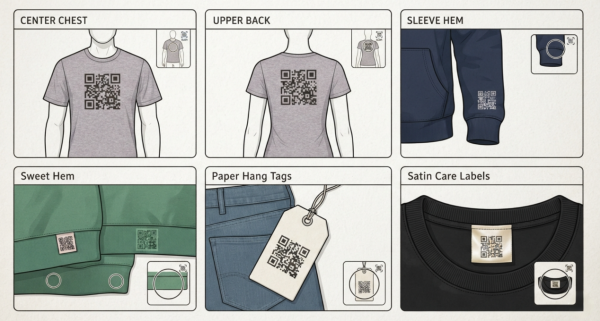
On Shirts, Hoodies, and Sweaters
If the QR code is the main design element on the fabric itself, consider these locations:
• Center Chest or Upper Back: This is the most visible area. It keeps the QR code relatively flat on the body, making it the ideal spot for social media links, festival shirts, and promotional event tees.
• The Sleeve Hem: A smaller QR code printed just above the sleeve cuff is subtle, sophisticated, and highly accessible for quick scanning
• The Bottom Hem (Inside or Outside): If you want a discrete option for your brand, place a small tag or direct print on the bottom edge of the shirt. It stays out of the way of the main design while remaining accessible to those looking for it.
On Clothing Tags and Labels
For retail brands, putting the code on accessories rather than the garment itself is often the most practical choice:
• Paper Hang Tags: Printing your code on the main price or brand tag is highly recommended. Because paper is a completely flat, rigid surface, it offers the highest scan reliability.
• Satin Care Labels: If you print the code on the fabric care label inside the collar or side seam, ensure the fabric is high-density satin or woven polyester to prevent the ink from bleeding and distorting the code's pattern.
Step-by-Step: How to Make a QR Code for a Shirt or Label
Creating your code is straightforward, but making a few key choices during the setup phase will save you time and printing costs later.
Step 1: Choose a Watermark-Free Generator (Avoid the "Free Trap")
Watch out for the common "free generator trap." Many online tools let you download a QR code, only to deactivate it or force watermark ads after it hits a low scan limit. Once your apparel is printed, a dead link means wasted inventory and costly reprints.
To protect your investment, always use a transparent platform. Our free QR code generator ensures your static codes stay active forever with unlimited scans, no forced sign-ups, and absolutely no hidden watermarks.

Step 2: Select Your Destination Link
Decide what your QR code should do when scanned. Copy and paste the exact destination URL. This could be:
✔️ Your e-commerce shop or a specific product page.
✔️ Your brand's Instagram, TikTok, or a Linktree social landing page.
✔️ A direct payment link (like PayPal or Venmo) for custom "Buy me a drink" event teStatic QR Codes: The data is hardcoded directly into the pixel pattern
Step 3: Choose Your Code Type (Static vs. Dynamic)
This is the most critical decision you will make:
✔️ Static QR Codes: The data is hardcoded directly into the pixel pattern. If you print 500 shirts and later realize there is a typo in the URL, or if you change your social media handle, those 500 shirts are permanently ruined. Static codes are fine for simple, permanent links.
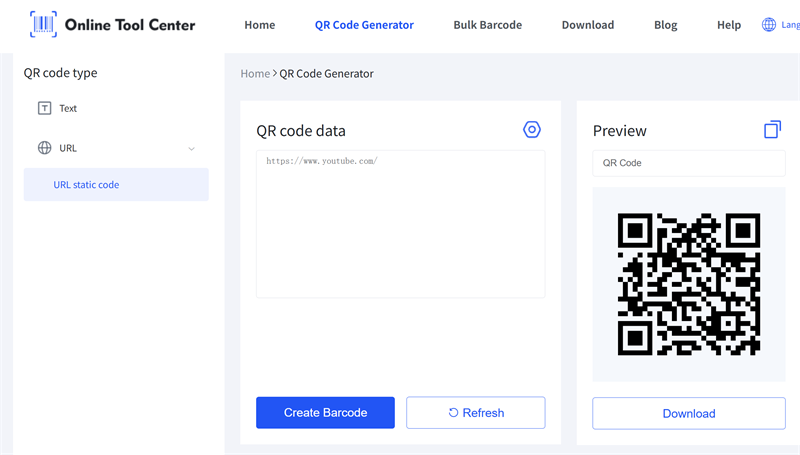
✔️ Dynamic QR Codes: The printed pattern contains a short redirect URL. This allows you to log into your dashboard and change the destination link at any time—even after the shirts have been printed, shipped, and worn. Dynamic codes also let you track scanning analytics (how many people scanned, when, and from what devices), making them highly recommended for commercial clothing brands.
Step 4: Customize and Download in Vector Format
Once you enter your link, you can customize the code's colors, corner styles, and even add a small logo in the center to match your brand's aesthetic.
When you are ready to export, avoid using standard PNG or JPG files for textile printing. Instead, utilize our generator to download your design in a vector format (SVG).
Unlike pixels, vector files can be scaled to any size by screen printers or print-on-demand services without losing sharpness, ensuring your printed code remains perfectly crisp and scannable on fabric.
Essential Printing Tips to Ensure Your QR Code Actually Scans
Printing on fabric is vastly different from printing on paper. Textile fibers stretch, wrinkle, absorb ink, and fade over time. Keep these golden rules in mind before sending your design to the print shop:
Contrast is King
QR code readers rely on detecting light and dark areas. If there isn't enough contrast, the scanner will fail:
• Do: Print a dark colored code (black, navy, dark green) on a light-colored garment (white, cream, heather gray).
• Don't: Print a dark gray code on a black shirt, or a pastel yellow code on a white shirt.
• The Dark Shirt Solution: If you must print on a dark shirt, make sure to generate your code with a solid white background block (known as the "quiet zone") around it.
Size Matters on Fabric
Because fabric stretches and folds when worn, your QR code needs to be slightly larger than it would be on a flat paper flyer:
• On garments (T-shirts/Hoodies): The code should be at least 2 inches x 2 inches (5 cm x 5 cm) to allow for easy reading even when the fabric has slight folds or wrinkles.
• On rigid hang tags: You can go smaller, down to a minimum of 0.8 inches x 0.8 inches (2 cm x 2 cm), provided the print quality is crisp.
Test Before You Print in Bulk
Never skip the physical testing phase.
1. Print a draft of your design on a standard piece of paper at the exact scale you plan to use on the shirt.
2. Tape it to a shirt, put the shirt on a person (or mannequin) to simulate natural body curves, and try scanning it with both iPhone and Android cameras under different lighting conditions.
3. If it scans quickly from a distance of 1 to 2 feet, your design is ready for the print shop.
Ready to Create Your QR Code on Clothing?
Adding a digital layer to your garments is a highly effective way to engage with friends, fans, or customers. By choosing the right placement, ensuring high contrast, and exporting your design in high-resolution vector formats, you can create interactive apparel that looks professional and functions reliably.
Ready to get started? Use our specialized clothing QR code generator to design, customize, and download your high-quality vector QR code for free today.
