



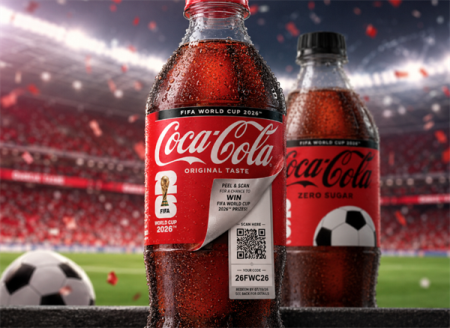
Coca-Cola FIFA World Cup 2026 codes promotion is a QR-based reward campaign where users can collect free digital sticker packs by scanning codes on participating Coca-Cola products or entering promo codes in the official Panini app.
To join the campaign, users typically purchase eligible Coca-Cola products, scan a QR code or enter a printed code, and instantly unlock digital rewards such as sticker packs, collectibles, or bonus entries inside the FIFA Panini Collection system.
This guide explains exactly how to participate, where to find codes, and how to maximize your daily rewards during the FIFA World Cup 2026 promotional period.
1. What You Can Get from the Coca-Cola FIFA 2026 Promotion
The main attraction of this promotion is simple: free digital rewards tied to the FIFA World Cup 2026.
Most participants join to collect:
• Free digital sticker packs in the FIFA Panini Collection App (5 stickers per pack, redeemable daily)
• Limited physical Panini stickers hidden under select 20-oz Coca-Cola and Coke Zero Sugar bottle labels
• Bonus packs unlocked through daily Coca-Cola code redemption
• Special promotional rewards including chance to win an Official Match Ball of FIFA World Cup 26
New rewards are often released throughout the campaign period, encouraging daily participation rather than one-time use.
According to official announcements from Coca-Cola North America and Panini America, this joint campaign features more than 1 billion special-edition physical Panini stickers distributed globally under select 20-oz Coca-Cola and Coke Zero Sugar bottles, spotlighting 12 international football superstars from 10 nations competing in FIFA World Cup 26.
2. How to Join the Coca-Cola FIFA World Cup 2026 Promotion
Getting started is straightforward and does not require advanced setup.
To participate, follow these basic steps:
1. Buy a participating Coca-Cola product
2. Look for a QR code or printed promo code
3. Scan the QR code or enter the code in the Panini digital app
4. Sign in or create a FIFA/Panini account
5. Claim your free digital sticker pack instantly
Once completed, your rewards are added directly to your digital album and can be accessed across devices.
3. Where to Find Coca-Cola FIFA 2026 Promo Codes
Promo codes are usually placed in several physical and digital locations depending on the product type and region.
You can typically find them in:
• Under select 20-oz bottle labels
• Inside bottle labels or peel-back packaging
• Printed directly on cans or multipack packaging
• On official Coca-Cola campaign pages
• Through partner promotional events or limited campaigns
Each code is designed for single or limited use depending on the promotion rules in your region.
4. How to Redeem Coca-Cola FIFA 2026 Codes
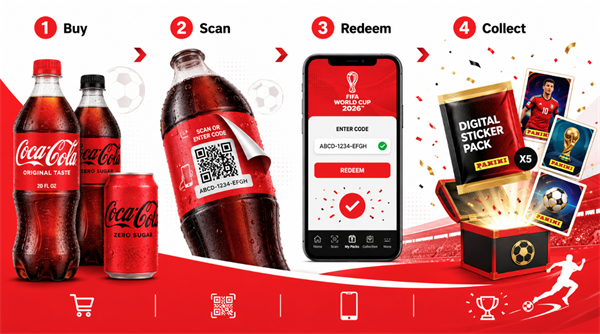
Once you have a valid code, redemption takes only a few steps inside the official system.
In the Panini Mobile App:
1. Open the FIFA Panini Collection app
2. Log into your account
3. Tap the “Promo Code” section
4. Enter your Coca-Cola code
5. Confirm to receive your reward instantly
In the Web Version:
1. Visit the official Panini FIFA collection platform
2. Sign in with your account
3. Locate the promo code input box
4. Submit your code and sync rewards across devices
Rewards are usually added immediately after successful validation.
5. How to Maximize Your Rewards
Most users collect rewards faster by combining multiple participation methods instead of relying on a single code source.
To increase your chances, you can:
• Scan one Coca-Cola product daily for new codes
• Check promotional updates regularly
• Redeem codes immediately after receiving them
• Participate in partner promotions when available
• Keep your app updated for new reward drops
Daily engagement often results in more consistent reward accumulation throughout the campaign.
6. Troubleshooting Coca-Cola Panini App Codes & Scanning Issues
Some collectors may encounter minor technical issues during the redemption process. Most of these errors can be resolved quickly with the following troubleshooting steps:
Why is my Coke promo code not working?
Redemption errors are usually caused by input typos, extra spaces, or using expired codes. Verify in your app inventory that the code hasn't already been claimed. Note that most unique single-use codes expire 30 days after they are generated.
Why does the QR code scanning fail?
Scan failures are typically caused by glare, shadows, or low screen brightness. Increase your phone's screen brightness to at least 80%, clean the camera lens, and hold the device 6 to 8 inches away from the Coca-Cola label. If the camera screen remains black, restart the Panini app to reset its AR framework.
Why are my claimed card packs not showing up?
Server synchronization can sometimes take 2 to 5 minutes. Check under the "My Packs" tab to see if they have arrived. If they are missing, restart the app to force a data refresh, or log out of your FIFA/Panini ID and log back in to resolve database sync lag.
How do I bypass the "4 Packs Per Day" limit?
The app enforces a strict limit of opening 4 sticker packs per day. Any extra Coca-Cola codes you redeem will not be lost; instead, they are saved directly into your virtual inventory to be opened on subsequent days. This daily opening limit resets at 12:00 AM Eastern Time (ET).
(Note: The daily Coca-Cola promotional portal is open to legal residents of the 50 U.S. states and Washington D.C., aged 13 or older.)
Final Takeaway
The Coca-Cola FIFA World Cup 2026 codes promotion is designed for simple participation. Users only need a participating product and a valid code to start collecting free digital FIFA-themed rewards through the Panini system.
If you're planning to join, the key is consistency—daily participation usually leads to more rewards and faster album completion.
