
When a new book is ready for publication, creating an ISBN barcode is not optional—it is a required step for distribution, retail, and inventory systems. For publishing teams managing multiple titles at once, generating ISBN barcodes one by one can quickly become time-consuming and error-prone.
This is why many publishers look for a simple and reliable way to create multiple ISBN barcodes at once—without installing complex software or learning barcode standards from scratch.
If you need to generate ISBN barcodes in batch—accurately and in compliance with GS1 standards—an online bulk barcode generator tool can be the most practical solution.
Who Needs to Create ISBN Barcodes for Multiple Books?
Creating ISBN barcodes at scale is especially relevant for:
• Publishing house staff preparing multiple new titles
• Educational publishers launching textbook series
• Self-publishers managing several books or editions
• Printing and prepress teams creating ready-to-print book covers
In all these cases, the priority is the same:
accuracy, standard compliance, and simplicity.
Most users are not barcode experts. They do not want advanced design features—they want ISBN barcodes that work correctly in real distribution environments.
ISBN Barcodes and GS1 Compliance: What Publishers Must Know
An ISBN barcode is not just a number turned into lines.
In practice:
• An ISBN is encoded as a GS1-compliant EAN-13 barcode
• The structure, check digit, and encoding rules must follow GS1 specifications
Common misunderstandings include:
• Using the wrong barcode type (for example, Code 128)
• Manually typing ISBNs without check digit validation
• Treating ISBNs as generic numeric strings
If an ISBN barcode is not GS1-compliant, it may fail when scanned by retailers, distributors, or warehouse systems—causing delays or rejections.
Why Publishers Prefer Online Bulk Barcode Generator for ISBN
Traditional barcode software can be powerful, but it often comes with drawbacks:
• Installation and licensing costs
• Steep learning curves
• Too many options for users who only need ISBN barcodes
For most publishing workflows, an online ISBN barcode generator is more efficient because it:
• Requires no installation
• Works directly in the browser
• Supports bulk copy and paste from Excel
• Reduces human error
• Focuses on standard-compliant output
This is especially valuable during peak periods such as seasonal releases or textbook launches.
How to Generate ISBN Barcodes in Bulk (Step-by-Step)
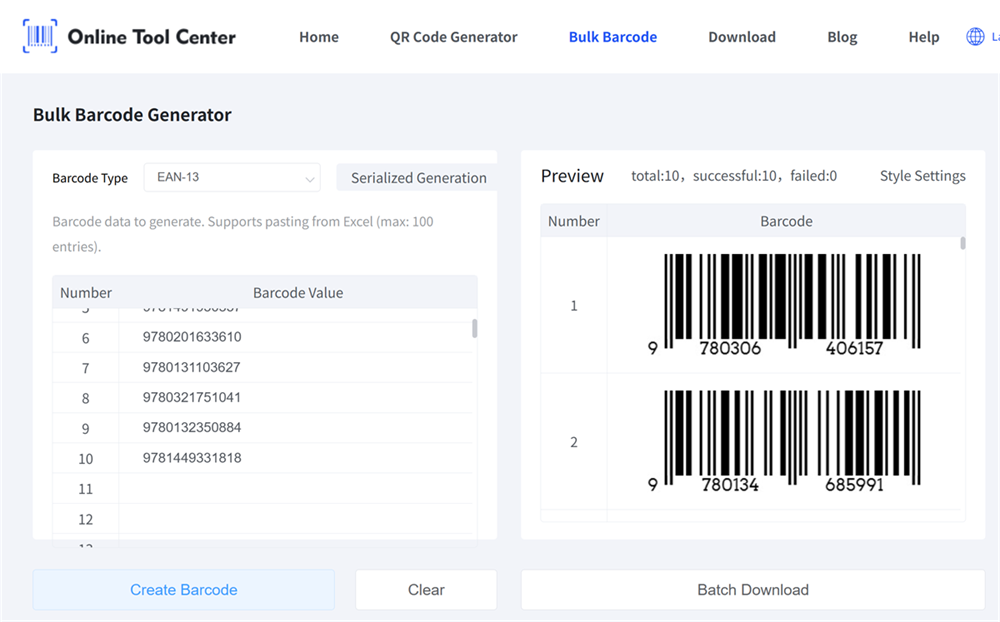
Here is a simple and practical workflow used by many publishers:
Step 1: Prepare Your ISBN List
Create a list of ISBN numbers, one per line.
You can copy them directly from Excel or a text document.
Step 2: Open a Bulk ISBN Barcode Generator
Use an online tool designed for batch processing.
Step 3: Paste ISBNs in Bulk
Paste your ISBN list into the input field. No file upload is required.
Step 4: Select an ISBN-Compatible Barcode Format
Choose EAN-13 / ISBN to ensure GS1 compliance.
Step 5: Generate and Download
Generate the barcodes and download them for use on book covers, back covers, or printing layouts.
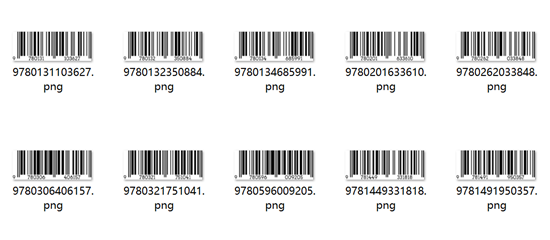
This process allows you to create dozens or hundreds of ISBN barcodes in minutes.
Common ISBN Barcode Mistakes (and How to Avoid Them)
Even experienced teams sometimes encounter issues. The most common mistakes include:
• Using a barcode type that is not suitable for ISBN
• Ignoring check digit validation
• Resizing barcodes in design software without preserving proportions
• Printing with insufficient contrast
Using a dedicated ISBN barcode generator helps avoid these problems by applying correct encoding rules automatically.
FAQ: ISBN Barcode Generation for Publishers
Q1: Can I generate ISBN barcodes for multiple books at once?
Yes. Bulk input allows you to generate multiple ISBN barcodes in a single session.
Q2: Are these ISBN barcodes GS1-compliant?
When generated using the correct EAN-13 format, ISBN barcodes follow GS1 standards.
Q3: Do I need to register ISBN numbers before generating barcodes?
Yes. You should only generate barcodes for officially assigned ISBNs.
Q4: Can I use these barcodes for retail and distribution?
GS1-compliant ISBN barcodes are suitable for book covers and retail scanning systems.
Q5: Is this free ISBN barcode generator suitable for publishers?
Yes. It is designed for practical publishing workflows without unnecessary complexity.
For publishing professionals, having a reliable way to create ISBN barcodes efficiently is not just a convenience—it is a productivity advantage.By using a simple online ISBN barcode generator, publishers can create accurate, GS1-compliant barcodes quickly and confidently, even during high-volume release periods.
If you need a fast and reliable way to generate ISBN barcodes in bulk, you can try it here: