
For high-volume shipping and direct mail, efficiency is critical. When hundreds of addresses must ship on a tight deadline, the Intelligent Mail Package Barcode (IMpb) becomes essential, enabling USPS discounts, tracking, and piece-level visibility.But here is the problem: IMpb is complex. You cannot just type a number into a font generator. The solution? Automating the process with a powerful bulk barcode generator.
Why IMpb Generation Is More Complex Than It Looks

Unlike basic barcodes, IMpb follows strict USPS specifications. Each barcode must be built from multiple data elements, including the Service Type Code (STC), Mailer ID (MID), serial number, and routing information—plus a valid checksum.
Trying to generate IMpb labels manually, or one at a time, is inefficient and error-prone. Even working directly in Excel can quickly lead to formatting mistakes, duplicated serial numbers, or invalid barcode structures.
That's why many shipping teams look for a bulk IMpb barcode generator that can streamline this process while staying compliant.
Bulk IMpb Generation Using Our Free Online Tool
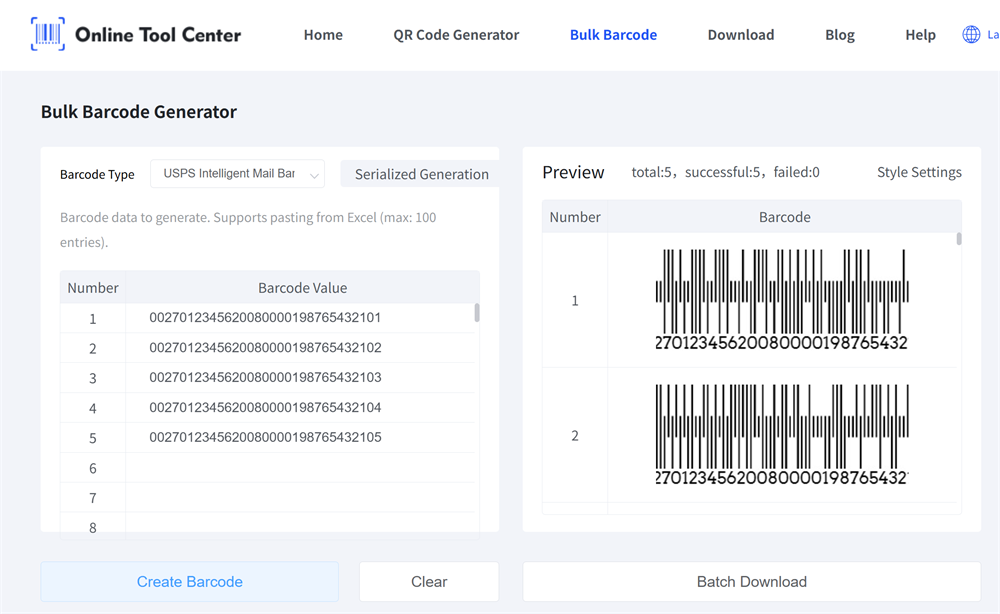
To support these real-world needs, we offer a free online bulk barcode generator that supports USPS Intelligent Mail Package Barcodes (IMpb).
You don't need to install software or upload files. Simply copy and paste data from Excel, CSV files, or Google Sheets, and the tool will generate compliant IMpb barcodes in seconds—up to 100 barcodes per batch.
This approach is especially useful for:
• E-commerce sellers preparing daily USPS shipments
• Logistics teams handling direct mail or fulfillment batches
• Operations managers who need consistency and accuracy under time pressure
Step-by-Step: From Excel Data to IMpb Barcodes
Ready to streamline your shipping process? Follow this simple guide to generate your barcodes in bulk.
Step 1: Prepare Your Data Source
In Excel, Google Sheets, or a CSV file, organize your IMpb values so each barcode value appears on its own row.
Make sure your data follows USPS IMpb formatting rules and includes all required elements (such as MID, STC, and serial number).
Step 2: Paste Your Data into the Bulk Generator
Go to our bulk barcode generator page and select USPS Intelligent Mail Package Barcode as the barcode type.
Paste your barcode values directly from Excel, CSV, or Google Sheets into the input field. The tool supports batch generation of up to 100 entries at a time, keeping the process fast and manageable.
Step 3: Preview and Generate
Once your data is pasted, the generator instantly previews each IMpb barcode so you can visually verify accuracy before downloading.
With one click, you can generate Intelligent Mail Package Barcode in bulk—no manual formatting, no repeated steps.
Step 4: Customize and Download
Before downloading, you can fine-tune the appearance of your barcodes to match your printing and labeling needs.
With our bulk IMpb generator, you can:
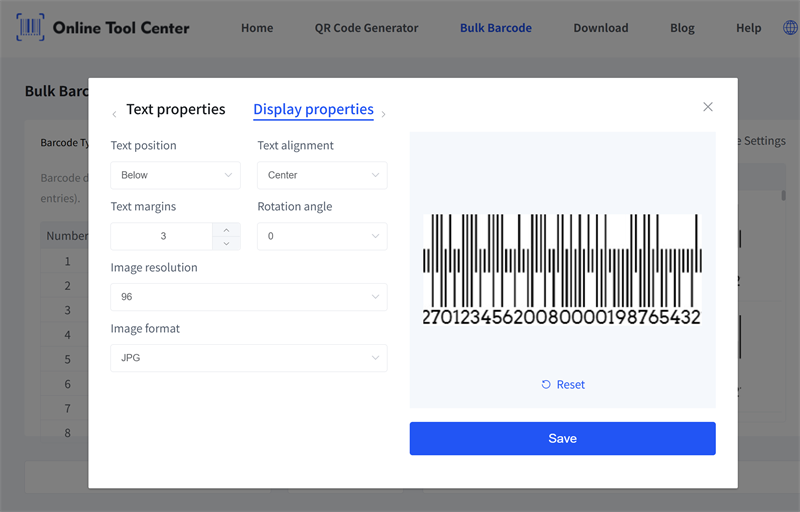
• Choose whether to display the human-readable value below the barcode
• Adjust barcode margins to fit different label layouts
• Customize barcode color for better contrast or specific use cases
• Select the output format, including JPG or PNG, depending on your workflow
Once your settings are ready, download the generated barcodes and use them immediately for printing, labeling, or digital records.
Next, choose a suitable label printer for your application. Ensure the printer is set to a resolution of at least 300 DPI (dots per inch) so the barcode bars remain crisp, sharp, and fully scannable by USPS systems.
Shipping compliance doesn't have to be a bottleneck. By moving away from manual entry and utilizing a professional bulk barcode generator, you eliminate human error, ensure USPS compliance, and most importantly, free up your time to focus on growing your business.