



Need a quick QR code for a website, contact details, product page, or document link? A static QR code is often the easiest choice.
It is simple to create, easy to download, and ideal for information that does not need to change. Better still, you can create a static QR code for free without signing up, without installing software, and without adding a watermark to your QR code.
In this guide, you will learn what a static QR code is, how to create one for free, which file format to download, and more.
What Is a Static QR Code?

A static QR code is a QR code that stores fixed information directly inside the code pattern. Once the QR code is created, the information cannot be changed.
For example, if you create a static QR code for a website URL, that exact URL is encoded into the QR code. When someone scans it, their phone reads the link and opens the page.
The key point is simple:
A static QR code is best for information that will stay the same.
You can use a static QR code for a website link, WiFi details, plain text, email address, phone number, contact information, or a PDF link.
Unlike dynamic QR codes, static QR codes usually do not require a dashboard, subscription, or tracking system. That is why many users prefer a free static QR code generator for simple everyday and business use.
Use Our Free Static QR Code Generator: No Watermark, No Sign-up
If you want to create a clean, ready-to-use QR code, our free QR code and barcode generator tool is designed for exactly that.
You can generate a static QR code online, download it instantly, and use it on your materials without a watermark. No account is required.

1. Create Static QR Codes for Free
Our tool supports static QR code generation for fixed information such as URLs, text, contact details, phone numbers, and more.
You can create a static QR code for free and use it for personal, educational, or business purposes.
2. No Sign-up Required
Many users want a QR code quickly. They do not want to create an account, verify an email, or go through a long setup process.
With our no sign-up QR code generator, you can enter your content, generate the QR code, and download it directly.
No login.No email required.No unnecessary steps.
3. No Watermark on Your QR Code
A watermark can make a QR code look less professional, especially when it is used on business cards, product packaging, menus, flyers, labels, or printed signs.
Our tool allows you to create a clean static QR code with no watermark, making it suitable for professional and commercial use.
4. Customize Your QR Code Design
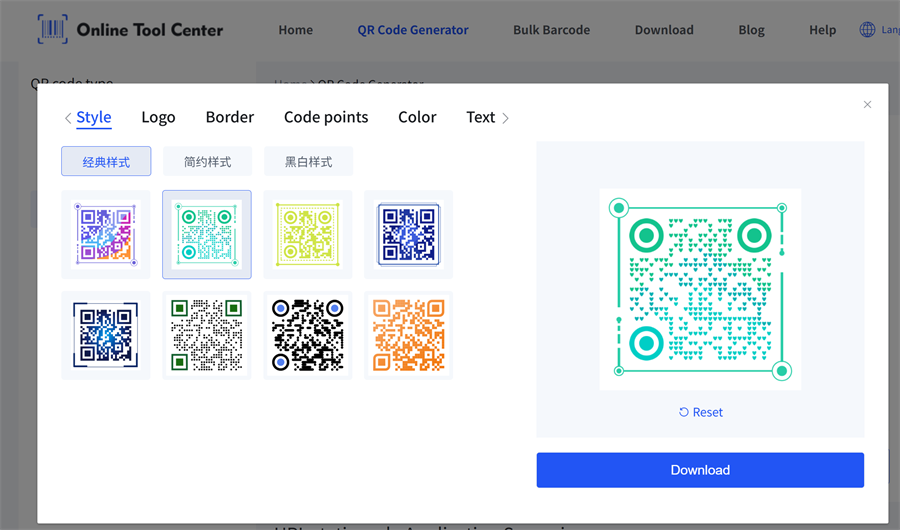
Create a custom QR code by adjusting colors, background, borders, code point styles, and adding your logo for a more branded look.
This is ideal for business cards, packaging, posters, menus, labels, and other marketing materials. Just keep strong contrast and clear spacing to ensure easy scanning.
5. Download in JPG, PNG, GIF, or SVG
Different projects need different file formats. Our static QR code generator supports downloads in JPG, PNG, GIF, and SVG.
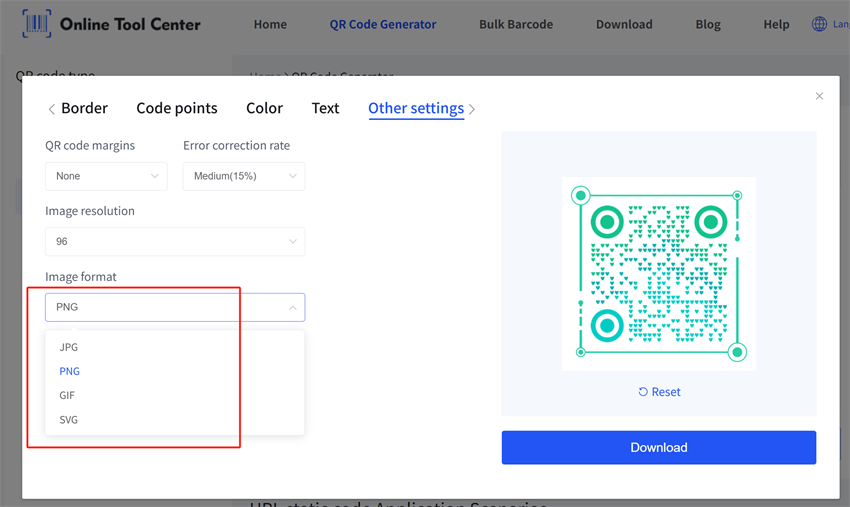
Here is a simple guide:
Format | Best For |
JPG | Simple image use, documents, quick sharing |
PNG | Clear digital use, websites, presentations, general downloads |
GIF | Lightweight web use and simple online display |
SVG | Print design, packaging, labels, posters, business cards, scalable graphics |
If you are adding a QR code to a website or digital document, PNG is usually a good choice.
If you are designing packaging, posters, labels, or printed materials, SVG is often better because it can scale without becoming blurry.
6. Also Supports Barcode Generation
Besides static QR codes, our tool also supports barcode generation. This is useful for product labels, inventory management, retail tags, packaging, warehouse labels, and other business applications.
So if you need both QR codes and barcodes, you can create them in one place.
How to Create a Static QR Code for Free
Creating a static QR code is simple. Use our reliable generator, follow these steps.
Step 1: Choose What Your QR Code Should Open
First, decide what the QR code should do when scanned.
Common options include:
✔ Website URL
✔ Plain text
✔ Email address
✔ Phone number
✔ SMS message
✔ Contact details
For example, a restaurant may create a static QR code for a menu link. A small business may create one for a product page. A hotel may create one for guest WiFi access.
Choose a content type that will not change often.
Step 2: Enter Your Information
Next, enter the information into the QR code generator.
Before generating the QR code, check the details carefully:
• Make sure the URL is correct.
• Use a stable link for PDF or document files.
• Make sure phone numbers and email addresses are accurate.
• Avoid using temporary links if the QR code will be printed.
This step matters because a static QR code cannot be edited after creation. If the information is wrong, you will need to generate a new QR code.
Note: Data encoded directly in a static QR code cannot be changed. But if it points to a short link or third-party URL, the destination page may still be changed by that website.
Step 3: Generate the Static QR Code
Click the button to generate your QR code and preview the result.
You can also customize your QR code with our tools, such as changing the color, style, and size.
Step 4: Download Your QR Code
After generating your static QR code, choose the file format that fits your use case.
There is no watermark and no sign-up required, so you can create and save your QR code right away.
Avoid taking screenshots of your QR code. Screenshots may reduce quality and make the QR code harder to scan, especially after printing.
Step 5: Test Before You Share or Print
Before using your QR code, always test it.
Scan it with different phones and check that it opens the right content. If you plan to print it, print a small sample first and scan the printed version.
Testing only takes a moment, but it can prevent costly printing mistakes.
Tips for Creating a Clean QR Code Without Watermark
A no-watermark QR code looks cleaner and more professional. To make sure your QR code scans well and looks good, follow these tips.
Download the Original File
Do not use screenshots if you plan to print or design with the QR code. Download the original JPG, PNG, GIF, or SVG file from the generator.
Keep Strong Contrast
Black on white is the safest choice. If you use colors, make sure the QR code has enough contrast against the background.
Low contrast can make scanning difficult.
Keep the Quiet Zone
The quiet zone is the blank space around the QR code. It helps scanners recognize the code.
Do not place text, logos, borders, or design elements too close to the QR code.
Choose the Right Format
For digital use, PNG is usually enough.For print design, SVG is often the best option because it stays sharp when resized.
FAQ About Static QR Codes
Can I create a static QR code for free?
Yes. You can use a free static QR code generator to create a QR code online for fixed information such as a website URL, WiFi details, text, email, phone number, or document link.
Do I need to sign up to create a static QR code?
No. With our free QR code generator, you can create a static QR code without signing up, logging in, or providing an email address.
Will my free static QR code have a watermark?
No. Our tool allows you to create a clean static QR code with no watermark, making it suitable for business cards, packaging, flyers, menus, labels, and other materials.
What formats can I download?
You can download your static QR code in JPG, PNG, GIF, or SVG format. PNG is useful for most digital needs, while SVG is ideal for scalable print design.
Do static QR codes expire?
A static QR code itself usually does not expire because the information is stored in the QR code pattern. However, if the QR code links to a webpage, PDF, or file that is deleted, moved, or no longer available, the QR code may stop working properly.
Create Your Free Static QR Code Now
A static QR code is a simple and effective way to share fixed information. It works well for website links, WiFi access, business cards, product packaging, document links, labels, posters, and flyers.
With our free QR code and barcode generator tool, you can create a static QR code online with:
✔ No watermark
✔ No sign-up
✔ Free generation
✔ JPG, PNG, GIF, and SVG downloads
✔Support for both QR codes and barcodes
Ready to make one? Use our free static QR code generator to create, download, test, and use your QR code in minutes.
