



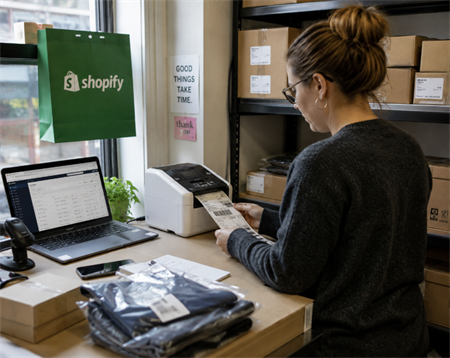
Selling products online is easy. Scaling product operations is not. The moment you start working with a 3PL, listing on Amazon, shipping pallets to retailers, or managing hundreds of SKUs, barcodes stop being optional. Suddenly warehouses want scannable labels. Marketplaces ask for GTINs. Retail systems reject invalid UPCs.
This is where many ecommerce sellers get confused. Because "creating a barcode" actually involves two different things:
· identifying the product
· encoding that information into a scannable format
Those are not the same problem.
This guide explains how retail product barcodes really work, when you need GS1 UPCs, when internal barcodes are enough, and how Shopify sellers can build a barcode system that scales.
Do You Really Need a Barcode for Your Products?

Not every ecommerce business needs official retail barcodes immediately. It depends on where the products will be sold and how inventory will move.
Selling Scenario | Barcode Requirement |
Small Shopify store with manual fulfillment | Often optional |
Internal warehouse inventory tracking | Usually recommended |
Working with a 3PL | Usually required |
Amazon, Walmart, Target Plus | Often requires valid GTIN or UPC |
Retail stores and distributors | Usually required |
Google Shopping product feeds | Often recommended or required |
The key distinction is this:
Internal inventory systems only need products to be uniquely identifiable inside your business.
Retail ecosystems need products to be globally identifiable across businesses.
That is why marketplaces and retailers care about GS1-issued identifiers.
SKU vs UPC vs GTIN vs Barcode
These terms are often mixed together, but they describe different layers of the system.
• SKU: Your internal inventory identifier.
• GTIN: Global product identification standard.
• UPC: A GTIN format commonly used in North America.
• EAN: International GTIN format.
• Barcode: The machine-readable representation of data.
A SKU belongs to your business.
A GTIN belongs to the retail ecosystem.
The barcode itself is simply the visual encoding method that allows scanners to read the data.
For example:
SKU: TSHIRT-BLK-XLGTIN: 012345678905
The SKU helps your warehouse identify the item internally.
The GTIN helps retailers, marketplaces, and supply-chain systems recognize the product globally.
Product Identity vs Barcode Format
This is where many barcode articles become misleading.
GTIN, UPC, and EAN are product identification systems. Code 128 and QR Code are encoding formats. Those are different categories.
A seller might use:
GTIN to generate a UPC-A barcode
or:
Internal SKU to create a Code 128 barcode.
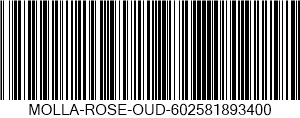
The barcode image itself does not determine whether the identifier is officially recognized in retail systems. The underlying number and ownership do.
What Type of Barcode Should You Use?
The correct barcode depends on the business requirement behind it.
UPC Barcodes
UPC-A is the most common retail barcode format in North America.
It is widely used for:
· retail checkout
· Amazon listings
· Walmart Marketplace
· distributors
· retail packaging
UPC codes are part of the GTIN system.
For many retail and marketplace environments, the UPC must be associated with a legitimate GS1-issued company prefix.
EAN Barcodes
EAN-13 is the international version commonly used outside North America.
Many ecommerce platforms support both UPC and EAN identifiers.
Code 128 Barcodes
Code 128 is widely used for logistics and internal inventory operations.
Unlike UPC, it supports letters, symbols, and variable-length data.
That makes it ideal for:
warehouse inventory
internal SKU labels
shelf labels
carton labels
3PL operations
Example:
TSHIRT-BLK-XL
can be encoded directly into a Code 128 barcode.
This is why many Shopify sellers use Code 128 for internal operations even when products do not yet have official retail GTINs.
QR Codes and 2D Barcodes
QR codes are increasingly used in ecommerce and supply-chain systems.
They can store:
URLs
product pages
traceability data
serial numbers
marketing content
authentication information
Retail checkout systems still primarily rely on UPC and EAN barcodes today.
However, the retail industry is gradually moving toward 2D barcode systems that can hold more product information than traditional linear barcodes.
So QR codes are no longer just "marketing tools." Their role inside retail ecosystems is growing rapidly.
How to Make Barcodes for Retail Products: Step-by-Step
Now let's look at the actual workflow.
Step 1: Decide Whether You Need Official Retail Identifiers
This is the most important decision in the entire process.
If your products only need internal inventory tracking, you can often create barcode labels directly from your own SKUs using Code 128.
If you plan to sell through retail channels, marketplaces, or distributors, you will usually need legitimate GTINs or UPCs associated with your brand.
This is where many sellers misunderstand the process.
Generating a barcode image is easy.
Obtaining a valid retail identifier is the real requirement.
Step 2: Organize Your Product Data
Before generating barcodes, standardize your inventory structure.
Each product variant should have:
· product name
· SKU
· variant attributes
· inventory quantity
· barcode or GTIN field
For example:
· Product Variant:Black T-Shirt Small,SKU:TSHIRT-BLK-S
· Product Variant:Black T-Shirt Medium,SKU:TSHIRT-BLK-M
· Product Variant:Black T-Shirt Large,SKU:TSHIRT-BLK-L
Every sellable variant should have its own unique identifier.
Step 3: Obtain GTINs or UPCs If Required
If your products will enter retail or marketplace ecosystems, use legitimate GTINs associated with your company or brand.
This is especially important for:
· Amazon FBA
· Walmart Marketplace
· retail stores
· distributors
· Google Shopping
Modern ecommerce platforms increasingly validate barcode ownership against GS1 databases.
The issue is not whether the barcode contains 12 digits.
The issue is whether the identifier is legitimately associated with the product and brand being sold.
Step 4: Generate the Barcode Image
Once the identifiers are ready, turn them into scannable barcode images.
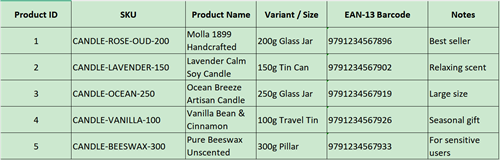
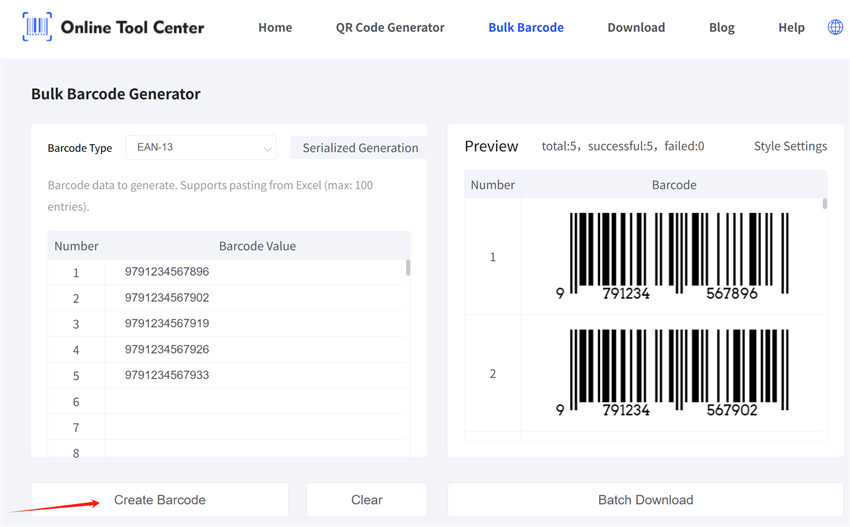
Our free bulk barcode generator is built for small businesses that manage inventory in Excel. You can paste SKUs, product codes, UPCs, or EANs directly from Excel and generate up to 100 barcodes at once.
It supports JPG, PNG, and other common image formats, so the files are easy to download, test, and add to label templates. This UPC and EAN barcode generator is especially useful when you need to create barcode labels for many SKUs at once.
Remember: choose Code 128 for internal SKU or inventory labels. Choose UPC-A or EAN-13 for retail packaging when you already have valid retail identifiers.
Before downloading the final files, check the barcode format, label size, export resolution, print layout, and quiet zone spacing.
Step 5: Test the Barcode Before Mass Printing
A barcode can look perfect and still fail to scan reliably.
Common problems include:
· low print contrast
· poor resolution
· insufficient quiet zones
· labels placed on curved surfaces
· reflective packaging materials
· oversized or undersized scaling
Always test with an actual barcode scanner whenever possible.
Phone cameras are not reliable substitutes for retail scanning environments.
Step 6: Print Barcode Labels
Once testing is complete, print the labels consistently across your inventory.
Thermal label printers are widely used because they are:
· fast
· durable
· cost-efficient
· suitable for bulk operations
Most ecommerce sellers eventually print:
· product labels
· warehouse labels
· carton labels
· shelf labels
· shipping labels
A clean barcode structure becomes increasingly valuable as the business scales.
How to Create Barcodes for Shopify Products
Shopify includes a barcode field for each product variant.
This field is commonly used to store:
UPC
EAN
ISBN
GTIN
internal barcode identifiers
The important part is understanding what type of identifier belongs there.
SKU vs Barcode Field in Shopify
This is one of the most common sources of confusion for Shopify sellers. SKU is internal inventory identifier, and barcode is scannable product identifier.
For example:
SKU: TSHIRT-BLK-XL
Barcode GTIN: 012345678905
The SKU helps your business organize inventory internally.
The barcode field is used for scanning workflows, marketplace integrations, and retail identification.
When Shopify Sellers Do NOT Need GS1 UPCs
If you only sell through your own Shopify store and manage inventory internally, official retail GTINs may not be necessary yet.
Many small brands simply use:
Internal SKU to make Code 128 barcode.
This works well for:
warehouse bins
picking operations
stock organization
internal inventory scanning
When Shopify Sellers SHOULD Use Official GTINs
Official GTINs become much more important when products move outside your own operational system.
This typically includes:
· Amazon
· Walmart Marketplace
· retail stores
· distributors
· large 3PL ecosystems
· Google Shopping integrations
Many modern retail and marketplace systems validate barcode ownership using GS1-associated company data.
That is why randomly generated UPC numbers often create problems later.
Creating Shopify Barcode Labels
Once barcode data is added to product variants, labels can be generated for printing.
Most sellers eventually create:
· product barcode stickers
· inventory labels
· warehouse labels
· shelf labels
The typical workflow looks like this:
Start by creating a SKU, then add the GTIN or barcode data, generate the barcode image, print the labels, and apply them to your products.
Simple workflows scale better.
That matters more than most sellers realize in the beginning.
Final Thoughts
Most ecommerce sellers initially think barcodes are just images.
They are not.
Retail barcodes are part of a larger product identification ecosystem involving marketplaces, warehouses, distributors, scanners, and inventory systems. The barcode graphic is only the visible layer.
The real foundation is the identifier behind it and the operational system around it. Once you understand that distinction, barcode decisions become much easier.
