



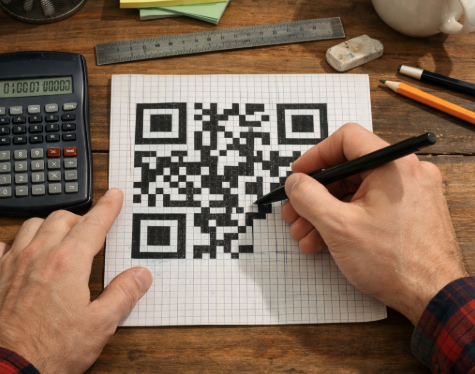
Most people think a QR code is just a random pattern of black squares. It isn't. A QR code follows a precise grid structure that encodes data in a way scanners can read instantly.
So can you actually draw a QR code by hand?
Technically yes. Practically, it's much harder than it looks. A real QR code follows strict placement rules, error-correction patterns, and a fixed grid layout.
This guide explains how a QR code is structured, how you could draw one step by step, and why most people eventually switch to a QR code generator instead.
Quick Answer
Drawing a QR code by hand is theoretically possible because every QR code follows a fixed square grid pattern. However, encoding the data correctly requires precise module placement and error-correction rules. In practice, most people use a QR code generator to create a fully scannable code in seconds.
What Is a QR Code Made Of?

A QR code is not random artwork. It is a structured matrix of small squares, called modules, arranged inside a grid.
Every QR code contains several key components.
Finder Patterns
The three large squares in the corners help scanners detect the code quickly. They also determine the orientation of the code.
You'll always see them in:
• the top left corner
• the top right corner
• the bottom left corner
These patterns allow a phone camera to recognize the code from any angle.
Timing Patterns
Thin lines of alternating black and white modules connect the finder patterns.
These timing patterns help scanners measure the spacing of the grid.
Data Modules
Most of the small squares in the center area store the encoded information.
This data could represent:
• a website link
• contact information
• Wi-Fi credentials
• text
Each square represents part of a binary pattern.
Quiet Zone
A QR code must include empty space around it. This margin is called the quiet zone.
Without this blank border, scanners may fail to detect the code.
Can You Actually Draw a QR Code by Hand?
In theory, yes. In practice, it is extremely difficult.
A working QR code requires three things:
1. a precise grid
2. correct data encoding
3. proper error-correction patterns
Even small mistakes can break the code.
For example:
• one misplaced module may corrupt the data
• incorrect timing patterns may confuse scanners
• missing quiet zones may prevent detection
That's why most hand-drawn QR codes fail to scan.
However, drawing one can still be a fun way to understand how QR codes work.
How to Draw a QR Code Step by Step
To draw a QR code manually, you first need to create the grid structure.
The smallest standard QR code (Version 1) uses a 21 × 21 grid.
Follow these steps.
Step 1: Draw the Grid
Start by drawing a square grid with 21 rows and 21 columns.
Each square represents one module.
Use graph paper or draw light pencil lines to keep the spacing consistent.
Accuracy matters. Uneven squares may prevent scanning.
Step 2: Add the Finder Patterns
Next, draw the three large positioning squares.
Place them in:
• top left corner
• top right corner
• bottom left corner
Each finder pattern consists of nested squares:
black → white → black.
These patterns help scanners recognize the QR code instantly.
Step 3: Add the Timing Patterns
Draw a row and column of alternating black and white modules between the finder patterns.
These lines create the timing pattern that defines the spacing of the grid.
They usually appear as a dotted line across the code.
Step 4: Fill the Data Modules
Now the remaining modules must store encoded data.
This step requires a QR encoding algorithm. The algorithm converts text or URLs into binary data and distributes it across the grid.
Without this encoding logic, a hand-drawn QR code will not contain meaningful data.
In other words, you can draw the structure easily. Encoding the data is the difficult part.
Why Hand-Drawn QR Codes Usually Don't Work
Most hand-drawn QR codes fail for a few common reasons.
Encoding Is Complex
QR codes use binary encoding with built-in error correction.
The process involves:
• data masking
• format information
• Reed-Solomon error correction
This logic is difficult to replicate manually.
Precision Matters
Each module must sit exactly in the correct position.
If the squares are uneven or distorted, scanners may reject the code.
Error Correction Still Has Limits
QR codes can recover from small damage, but they cannot fix incorrect data placement.
If the data pattern is wrong, the scanner has nothing to decode.
The Easier Way: Use a QR Code Generator
Instead of manually calculating module positions, you can generate a QR code instantly.
Our free online QR code generator handles all the encoding rules automatically. It creates a fully scannable code in seconds.
There's no software to install, and the generated QR codes come without watermarks. You can also export the code in multiple formats such as PNG or SVG, making it easy to use on websites, presentations, or printed materials.

You can even customize the appearance by adjusting colors, styles, and adding a logo if needed.
Creating a working QR code only takes three simple steps.
Step 1: Enter Your Content
Add the information you want the QR code to contain, such as:
• website URLs
• product links
• contact details
• plain text
The generator will automatically convert the content into the correct QR code pattern.
Step 2: Customize the Design
If you want the QR code to match your branding or design, you can adjust several visual elements, including:
• QR code colors
• module (dot) shapes
• frame styles
• embedded logos
These options allow you to create a QR code that looks unique while still scanning reliably.
Step 3: Download the QR Code
Finally, export the QR code in the format that fits your project. Once downloaded, the QR code is ready to use.

FAQ
Q1: Can you draw a QR code by hand?
Yes, but it is extremely difficult to encode the data correctly. Most hand-drawn QR codes do not scan properly.
Q2: How many squares are in a QR code?
The smallest standard QR code uses a 21 × 21 grid, although larger versions can contain many more modules.
Q3: Why won't my hand-drawn QR code scan?
The most common reasons include incorrect encoding, uneven module spacing, or missing quiet zones.
Q4: What is the easiest way to create a QR code?
The simplest method is to use a QR code generator, which automatically encodes the data and produces a scannable code.
Wrapping Up
Drawing a QR code by hand can be a fun exercise in understanding how the technology works. You can sketch the grid, add finder patterns, and learn how the structure fits together.
But encoding the actual data is another story.
That's why most people skip the manual process and use a QR code generator instead. It produces a perfectly scannable code in seconds and lets you customize the design without worrying about encoding rules.
Sometimes the best shortcut is simply using the right tool.
