



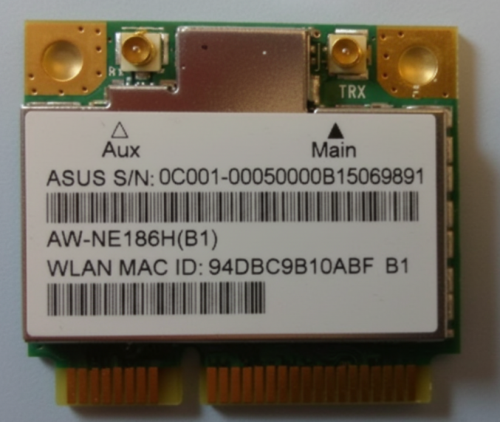
In IT and asset management, a MAC address is a key device identifier. Encoding it as a barcode lets teams scan MAC addresses instantly instead of typing them manually, reducing errors and saving time. And an online barcode generator makes it easy to create these labels quickly and at scale.
This guide explains what a MAC address barcode is, which barcode type works best, and how to generate MAC address barcodes step by step using an online barcode generator.
What Is a MAC Address Barcode?
A MAC address barcode is a barcode that represents a device's MAC (Media Access Control) address in a scannable format.
It's important to clear up a common misconception right away:
A MAC address barcode is not a special barcode standard.
Instead, it is simply:
A MAC address encoded using a standard barcode format, most commonly Code 128.
For example, the MAC address:
00:1A:2B:3C:4D:5E
can be encoded as a barcode containing:
001A2B3C4D5E
or
00:1A:2B:3C:4D:5E
The barcode itself follows a standard barcode specification—the data inside just happens to be a MAC address.
Why Use Barcodes for MAC Addresses?
If you manage network hardware, IT assets, or connected devices, MAC addresses show up everywhere. Turning them into barcodes offers several practical benefits.
1.Faster Identification
Scanning a barcode is much quicker than typing a 12-character hexadecimal string.
2.Fewer Errors
Manual entry often leads to mistakes like swapped characters or missing digits. Barcodes eliminate that risk.
3.Better Asset Tracking
MAC address barcodes are widely used to label:
• routers and switches
• access points
• servers and network cards
• IoT and smart devices
4.Easier System Integration
Scanned MAC addresses can be automatically captured by inventory systems, spreadsheets, or asset databases.
In short, barcode labeling helps keep things clean, consistent, and under control—no guesswork involved.
Which Barcode Type Is Best for MAC Addresses?
This is one of the most common questions users ask, and the answer is fairly straightforward.
✅ Code 128 (Recommended)
Code 128 is the most widely used barcode type for MAC addresses because:
• it supports letters and numbers
• it encodes data compactly
• it offers excellent scanning reliability
• it works well for labels of different sizes
Since MAC addresses use hexadecimal characters (0–9 and A–F), Code 128 is a natural fit.
⚠️ Code 39 (Sometimes Used)
Code 39 can encode alphanumeric characters, but it produces longer barcodes and is less efficient. It's usually chosen only for legacy systems.
❌ UPC / EAN
Retail barcode formats like UPC-A or EAN-13 are not suitable for MAC addresses, as they are designed for numeric retail identifiers.
Bottom line:
If you're generating a MAC address barcode, Code 128 is the safest and most practical choice.
How Should a MAC Address Be Formatted in a Barcode?
Another frequent point of confusion is formatting. MAC addresses are often written with separators, but barcodes don't always need them.
Common formats you'll see
• With separators:
00:1A:2B:3C:4D:5E
• Without separators:
001A2B3C4D5E
Which format should you use?
Both can work—but consistency matters more than style.
Best practice:
• Choose one format
• Use it consistently across all devices
• Match what your asset or inventory system expects
For bulk barcode generation, many teams prefer the separator-free format because it's shorter and cleaner. As the saying goes, pick a lane and stay in it.
How to Generate a MAC Address Barcode (Step by Step)
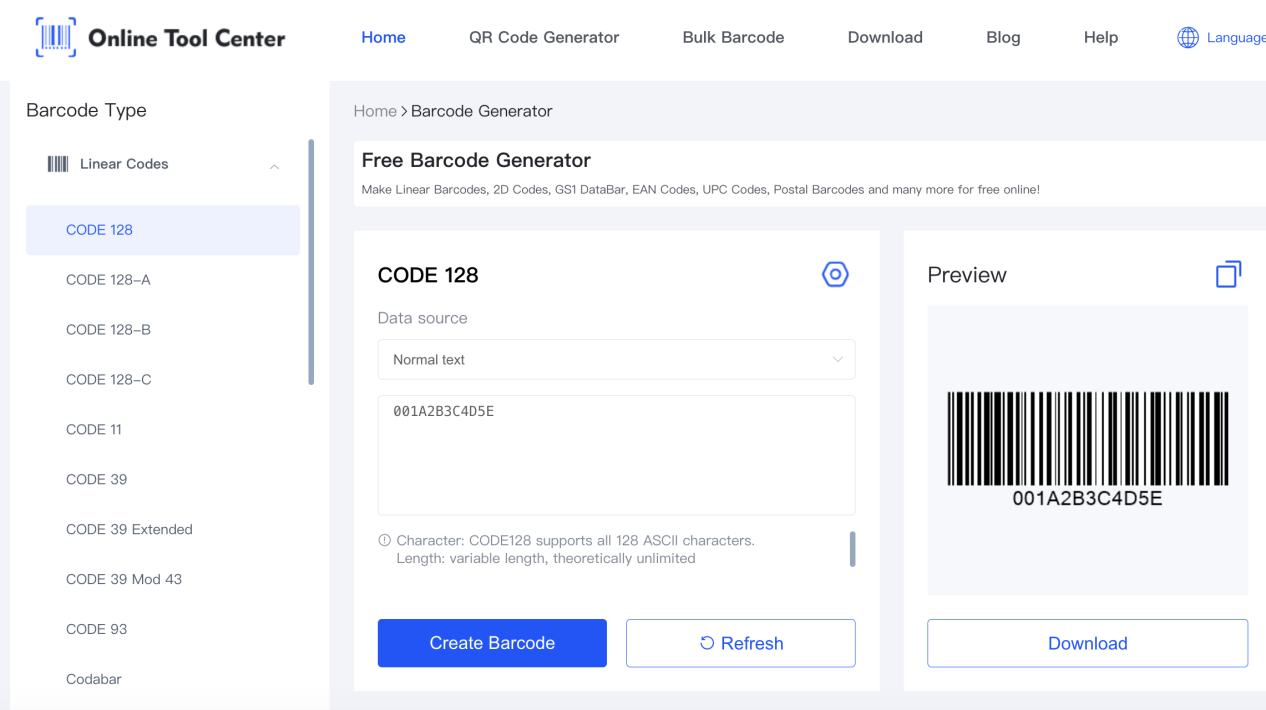
Creating a MAC address barcode doesn't require specialized software. An online barcode generator works perfectly for this task.
Here's a simple workflow most users follow.
Step 1: Prepare Your MAC Address Data
List each MAC address on its own line. For example:
001A2B3C4D5E
001A2B3C4D5F
001A2B3C4D60
If you're working from Excel or CSV, make sure there are:
• no extra spaces
• no duplicates
• consistent formatting
Step 2: Choose the Barcode Type
Select Code 128 as your barcode format. This ensures compatibility and reliable scanning.
Step 3: Paste the MAC Addresses into the Generator
Many online barcode generators support bulk generation, and our tool is one of them. It lets you create multiple 1D barcode formats—including Code 128, Code 39, EAN, UPC, and GS1—quickly and free of charge.
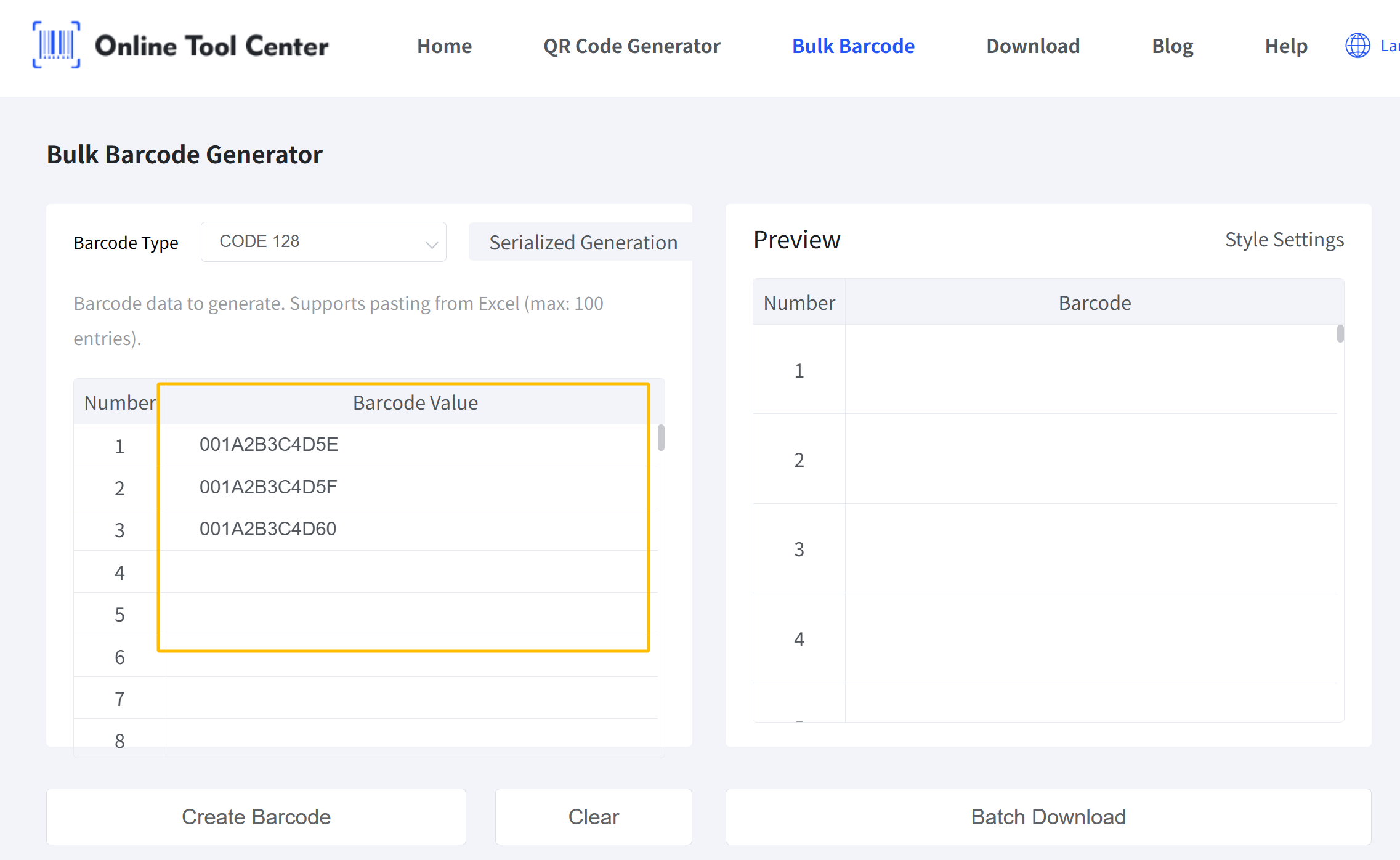
With this browser-based bulk barcode generator, you can simply copy your list of MAC addresses and paste them directly into the input field to generate barcodes in one go.
Step 4: Adjust Barcode Settings
Before generating, you may want to:
• enable or disable human-readable text
• adjust margins or quiet zones
• choose an output format such as PNG, JPG, or GIF
These options help ensure the barcode fits your label layout and prints clearly.
Step 5: Generate and Download
Generate the barcodes and download the images. They're now ready for:
• printing
• asset labels
• documentation
• inventory systems
Simple, efficient, and done in minutes.
Frequently Asked Questions
Q1: Can a MAC address be encoded as a barcode?
Yes. MAC addresses are commonly encoded using Code 128 barcodes.
Q2: Is a MAC address barcode a special barcode type?
No. It's a standard barcode (usually Code 128) containing a MAC address as data.
Q3: Should I include colons in the MAC address barcode?
Both formats work. Choose one format and use it consistently.
Q4: Can I generate MAC address barcodes in bulk?
Yes. Bulk generation is common and works well with spreadsheet-based input.
Q5: Are MAC address barcodes the same as serial number barcodes?
They are similar in concept, but the encoded data is different.
Stop typing MAC addresses by hand. Use our online barcode generator to turn MAC addresses into scannable barcodes for network devices, IT assets, and inventory management—accurate, consistent, and easy to scale.

