




QR codes appear almost everywhere today—on product packaging, restaurant tables, shipping labels, and marketing posters. Most of them use the traditional black-and-white design. However, many brands now experiment with colored QR codes, especially green QR codes, to match their visual identity or highlight sustainability themes.
But can QR codes actually be green? Will scanners still recognize them? And how do you create one without breaking the rules that make QR codes readable?
This guide explains what a green QR code is, how to generate one, and how to design colored QR codes that scan reliably.
What Is a Green QR Code?
A green QR code is simply a QR code where the standard black modules (the small squares that store the data) are replaced with green or dark-green color tones while keeping enough contrast between the code and its background.
In other words, the QR code still follows the same structure and encoding rules. Only the visual color scheme changes.
Designers often choose green QR codes for several reasons:
• Product packaging for eco-friendly or organic products
• Sustainable brands that want their marketing materials to reflect environmental themes
• Custom QR code design that matches a brand's color palette
• Smart packaging labels that link to digital product information
For example, a tea brand may print a dark green QR code on a white label that links to brewing instructions or product origin details.
From a technical perspective, the color itself does not matter. What matters is contrast and clarity, which allow camera scanners to detect the pattern.
Can QR Codes Be Green?
Yes, QR codes can be green, and they usually scan perfectly when designed correctly.
Despite the widespread belief that QR codes must be black, the scanning system only requires strong contrast between the foreground (modules) and background.
Most smartphone scanners convert the image into grayscale before decoding it. As long as the darker color clearly stands out from the background, the code remains readable.
Basic QR Code Color Rules
To ensure good scanning performance, follow these rules:
1. Use a dark foreground color
Suitable examples:
• dark green
• forest green
• navy blue
• dark purple
2. Use a light background
Common choices include:
• white
• light yellow
• pale green
• light gray
3. Avoid inverted colors
Light modules on a dark background confuse many scanners.
4. Maintain strong contrast
Low contrast combinations often cause scanning failures.
Good Color Combinations for QR Codes
Foreground | Background | Scannability |
Dark Green | White | Excellent |
Green | Light Yellow | Good |
Navy Blue | White | Excellent |
Purple | Light Gray | Good |
Poor Combinations to Avoid
• Light green on white
• Yellow on white
• Green on black
• Pastel colors with low contrast
In short, green QR codes work perfectly when the green is dark enough and the background stays light.
How to Generate a Green QR Code
Creating a green QR code takes only a few minutes. Most modern QR code generators allow full color customization.
Follow these steps.
Step 1: Choose a QR Code Generator
Start with a reliable QR code generator that supports color customization. Many online tools allow you to change the color of the QR modules and background.
Look for generators that offer:
• color customization
• vector download (SVG)
• high-resolution export
• error correction settings
These features help ensure the final QR code remains clear when printed.
Step 2: Enter the Content
Next, add the information you want the QR code to contain. Common examples include:
• website URL
• product landing page
• contact information
• digital menu
• instruction manual
For product packaging, brands often link the QR code to:
• product authentication pages
• traceability information
• tutorials or usage guides
Step 3: Customize the QR Code Color
Now change the module color from black to green.
A few safe design options include:
• dark green modules on a white background
• forest green modules on light yellow
• green gradient with strong contrast
• Avoid overly decorative designs that distort the QR pattern.
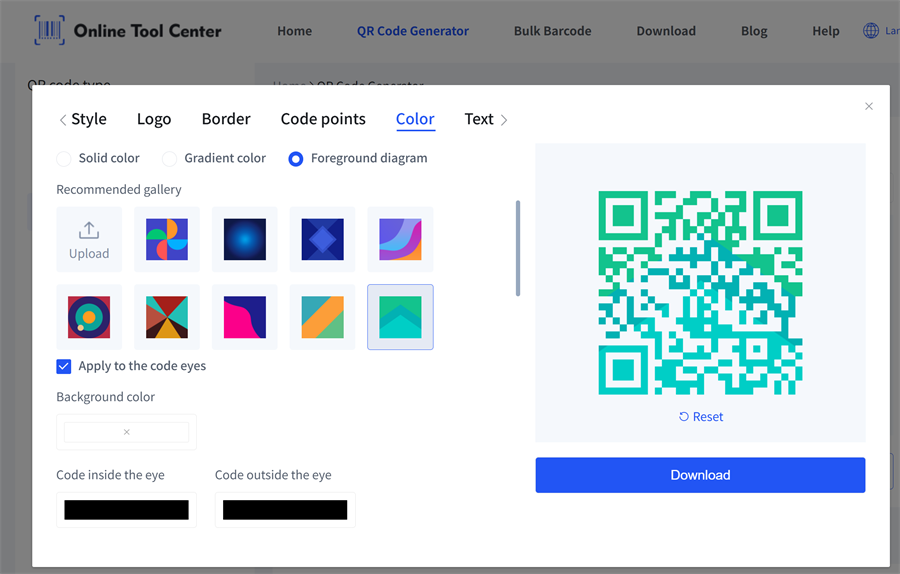
With our QR code maker, you can create QR codes in a wide variety of colors and color combinations in just a few clicks. Add unique border styles and design elements to make your QR code stand out and perfectly match your brand.

When designing a custom color QR code, clarity always matters more than aesthetics.
Step 4: Download a High-Resolution File
For digital use, a PNG file usually works fine.
For printing QR codes on labels or packaging, choose:
• SVG (vector format)
• high-resolution PNG
Vector files scale perfectly and maintain sharp edges during printing.
Best Color Combinations for QR Codes
When designing colored QR codes, the best approach is to maximize contrast while staying within your brand palette.
Here are several reliable combinations.
Dark Green + White
One of the safest options.
✅ excellent contrast
✅ visually clean
✅ ideal for packaging labels
Green + Light Yellow
This combination often appears in organic food packaging and eco-friendly products.
Dark Blue + White
A professional look often used in technology and finance industries.
Purple + Light Gray
Works well in creative marketing materials.
Design Tips for Green QR Codes
When creating a green QR code, design choices can affect how easily scanners recognize the pattern. A few simple guidelines help keep the code reliable.
✅ Use strong contrast
QR scanners rely on contrast to detect the code structure. Dark green modules on a light background usually provide the best results.
✅ Keep the quiet zone
Every QR code needs a clear margin around it. This empty space helps scanners identify the code quickly.
✅ Avoid light foreground colors
Light green or pastel colors can reduce readability. Darker shades of green work much better.
✅ Test before printing
Before printing QR codes on packaging or labels, scan them with different smartphones to ensure they work consistently.
✅ Use High-Quality Printing
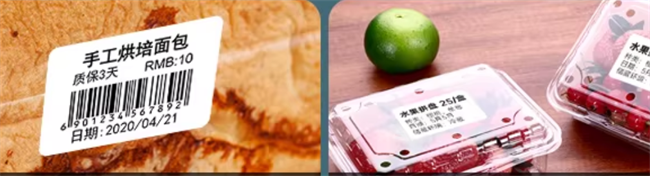
Low-resolution printing can soften the edges of the QR modules and reduce scanning accuracy. This issue is particularly common when QR codes appear on:
• product labels
• small packaging stickers
Using a high-resolution label printer helps maintain sharp edges and reliable scanning performance. Thermal label printers are often preferred for printing QR codes because they produce clear, high-contrast symbols.
Where Are Green QR Codes Used?
Green QR codes appear in many industries where design and branding matter.
Product Packaging
Many brands now place QR codes directly on packaging.
Scanning the code may reveal:
• ingredient information
• sourcing details
• usage instructions
• promotional content
A green QR code often blends naturally with eco-themed packaging.
Sustainable Product Labels
Sustainability initiatives frequently rely on QR codes to provide transparency.
A single scan can show customers:
• carbon footprint data
• supply chain information
• recycling instructions
In these cases, green QR codes visually reinforce the environmental message.
Marketing Materials
Marketing teams increasingly integrate QR codes into:
• posters
• brochures
• product displays
• event signage
Custom colored QR codes help maintain brand consistency.
Smart Packaging and Digital Experiences
Some companies use QR codes to turn physical products into digital touchpoints.
Scanning the code might open:
• product authentication pages
• augmented reality experiences
• loyalty programs
• customer feedback forms
In this context, QR codes act as bridges between physical packaging and online engagement.
FAQ About Green QR Codes
1. Are green QR codes harder to scan?
No. As long as the QR code maintains strong contrast between the modules and background, scanners read it just as easily as a black one.
2. Do QR codes have to be black?
No. QR codes can use many colors, including green, blue, purple, or dark red, as long as the foreground color is darker than the background.
3. What is the best color for a QR code?
The best QR code colors are dark foreground colors on a light background, such as black on white or dark green on white. High contrast helps scanners detect the pattern quickly and reliably.
4. Can you print QR codes on product labels?
Yes. QR codes are commonly printed on product labels and packaging to link to digital information, and clear printing with strong contrast helps ensure reliable scanning.
In Summary
A green QR code is simply a colored version of a traditional QR code. When designed correctly, it scans just as reliably as the classic black-and-white format.
To ensure reliable scanning, keep the modules dark, use a light background, maintain strong contrast, and preserve the quiet zone around the code. Testing the QR code before large-scale printing also helps prevent scanning issues.
With these basic rules in mind, brands and designers can confidently use green QR codes to match brand colors, enhance product packaging, and create more visually engaging printed materials.
