




A calling QR code is a QR code that allows people to call a phone number instantly by scanning it with their smartphone. Instead of typing the number manually, the user simply scans the code and the phone's dialer opens automatically.
This type of phone number QR code is widely used in customer service, retail stores, product packaging, and business cards. It makes communication faster and reduces typing errors. In this guide, you will learn what a calling QR code is, how it works, and how to create a QR code for a phone number step by step.
What Is a Calling QR Code?
A calling QR code is a QR code that contains a phone number. When someone scans the code with their phone camera, the device recognizes the phone number and opens the dial screen automatically.
The user only needs to tap the call button to start the call.
Because of this function, a QR code phone number is often used when businesses want customers to contact them quickly.
For example, companies may place a phone number QR code on:
• product packaging
• marketing posters
• receipts
• websites
• business cards
Scanning the code is faster than typing a phone number manually, especially when the number is long. In addition, using a calling QR code offers several benefits:
✅ Fewer errors – Users don't need to type the number, which reduces the chance of mistakes.
✅ Better customer experience – Scanning is quick, simple, and convenient.
✅ Wide compatibility – QR codes that dial phone numbers work on most smartphones, including both Android and iOS devices.
How a Calling QR Code Works
A QR code to call a phone number works by encoding the phone number using a special format.
The most common format looks like this:
tel:+1234567890
The tel protocol tells the smartphone that the content is a phone number. When the code is scanned, the phone understands that it should open the dialing interface.
The process usually looks like this:
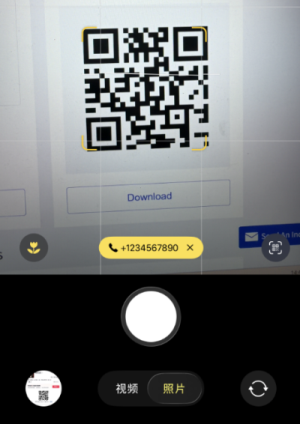
• The user scans the QR code.
• The smartphone reads the encoded phone number.
• The phone dialer opens automatically.
• The user taps the call button.
This simple process makes a QR code call phone number feature very convenient.
Common Use Cases of Calling QR Codes
A phone number QR code can be used in many situations where quick contact is important. Below are some common examples.
✅ Retail Stores
Retail shops often place a calling QR code on store posters or checkout counters. Customers can scan it to call customer support or store managers.
✅ Restaurants
Restaurants may add a QR code phone number to menus or advertisements. Customers can scan it to make reservations or ask questions.
✅ Product Packaging
Many companies print a QR code for phone number contact on packaging. If customers need help, they can scan the code and call support instantly.
✅ Business Cards
Modern business cards often include a phone number QR code. Instead of typing the number, people simply scan the card and call directly.
How to Create a QR Code for a Phone Number
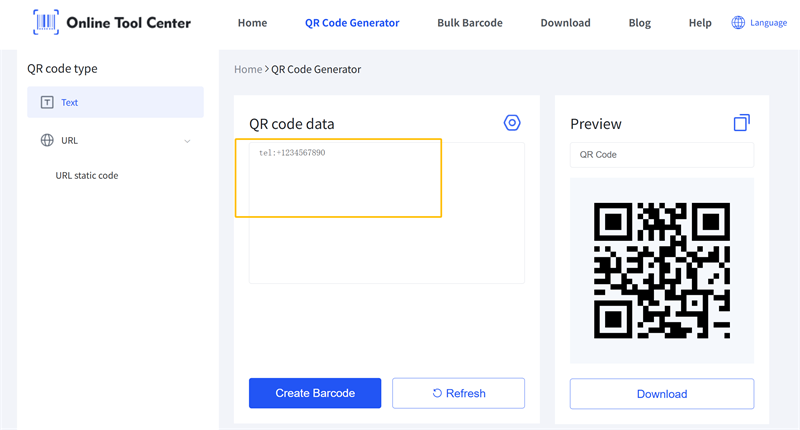
You can use an online QR code generator for phone numbers—it's easy and free. Most generators follow the same steps.
Step 1
Open an online QR code generator.
Step 2
Enter the phone number you want people to call.
Step 3
Make sure the number is encoded using the correct format.
Step 4
Click the generate button.
Step 5
Download the QR code image.
Once downloaded, you can print or share the QR code phone number wherever needed.
Additionally, some QR code maker tools offer customization features, letting you beautify your QR code by adding a brand logo, unique borders, colors, and more.
Start experiencing it now!

Best Practices When Creating Phone Number QR Codes
To make sure your QR code for phone number works properly, follow these best practices.
Use International Format
Always include the country code.
Example:
+18001234567
This ensures the phone number QR code works internationally.
Choose the Right QR Code Size
If you plan to print the code, make sure it is large enough to scan easily.
A minimum size of 2 cm x 2 cm is usually recommended.
Maintain Good Contrast
Use a dark QR code on a light background. This improves scanning accuracy.
Always Test the QR Code
Before printing thousands of labels or posters, test the QR code call phone number function on different devices.
FAQ About Calling QR Codes
Q1: Can a QR code dial a phone number?
Yes. A QR code can dial a phone number if the number is encoded using the correct format, such as the tel protocol. When scanned, the phone opens the dial screen automatically.
Q2: How do I create a QR code for a phone call?
You can create one by using a QR code generator for phone numbers or by encoding the phone number using the format:
tel:+1234567890
After generating the QR code, users can scan it and call the number instantly.
Q3: Do calling QR codes work on iPhone and Android?
Yes. Both iPhone and Android smartphones can scan a QR code for a phone number and open the dialing screen without extra software.
Final Words
A calling QR code is a simple but powerful way to help people contact a phone number quickly. By scanning the code, users can open the dial screen instantly and start a call without typing the number.
Creating one is easy. With the correct tel format or a QR code generator for phone numbers, you can generate a phone number QR code in just a few minutes.
As QR code usage continues to grow, adding a QR code to call a phone number is a smart way to make it easier for customers to reach you.
