




Running a small-to-mid-sized event often comes down to one thing: keeping check-in fast and accurate. Whether you're hosting a workshop, pop-up, school fair, or community meetup, a bulk barcode generator for events helps you create event ticket barcodes and attendee IDs in minutes—so you can verify entry, reduce manual errors, and stay organized.
In this guide, you'll learn how to generate barcodes for event tickets using a simple, repeatable workflow, plus practical ways to use barcodes for check-in, badge printing, and basic access control.
Why Use Event Ticket Barcodes for Check-In?
Using barcodes for ticketing is one of the simplest ways to streamline entry management:
• Faster entry: scan a ticket code instead of searching names on a list
• Cleaner validation: each ticket ID maps to one attendee record
• Less confusion: clearer handling of staff, VIPs, exhibitors, or guests
• Easier tracking: quick roll-call for sessions, workshops, or giveaways
This is the foundation of a lightweight event barcode system—no heavy setup required.
Use Cases for a Bulk Barcode Generator for Events
A bulk barcode generator helps create multiple unique barcodes from a simple list of ticket or attendee IDs—quickly and in a structured way. Instead of generating codes one by one, organizers can prepare their data in a spreadsheet and produce a complete set of event ticket barcodes in minutes.
So, what are the main use cases?
1) Event Check-In Barcodes for Faster Entry
For small events, event check-in barcodes provide a simple and reliable way to manage entry.
Using a batch barcode generator allows dozens of ticket barcodes to be created at once, each with a human-readable ticket ID. This ensures reliable verification even in challenging lighting conditions or when print quality varies.
2) Attendee Badge Generator Workflow for On-Site Identification

If you need name tags, a barcode-based attendee badge generator workflow is straightforward:
• Name + role (Guest / Staff / Speaker)
• Ticket ID / badge ID barcode
• Optional: company, session, or table number
By generating badge barcodes in bulk, organizers can quickly prepare on-site identification that supports fast entry checks, material distribution, and attendance tracking for training sessions or workshops.
3) Barcode Ticketing System for Basic Validation
A simple barcode ticketing system doesn't have to be complicated. Many organizers run a clean process with:
• a unique ticket ID per attendee
• barcodes generated in batches from a spreadsheet
• a check-in list (digital or printed) to mark attendance
This approach reduces accidental duplicates and speeds up onsite operations without turning your event into an IT project.
4) Barcode-Based Event Access Control for Zones or Sessions

If your event has multiple rooms or sessions, barcode-based event access control can be done using ticket ID prefixes or separate badge groups, for example:
• VIP-xxxx for VIP access
• STAFF-xxxx for staff entry
• WS1-xxxx for Workshop 1
• WS2-xxxx for Workshop 2
Generating these barcodes in batches keeps access rules consistent and easy to enforce at entry points, helping staff make quick, accurate decisions during the event.
How to Generate Barcodes for Event Tickets
Here's a practical, repeatable workflow that works especially well for small businesses and local organizers.
Step 1: Prepare Your Event Registration List
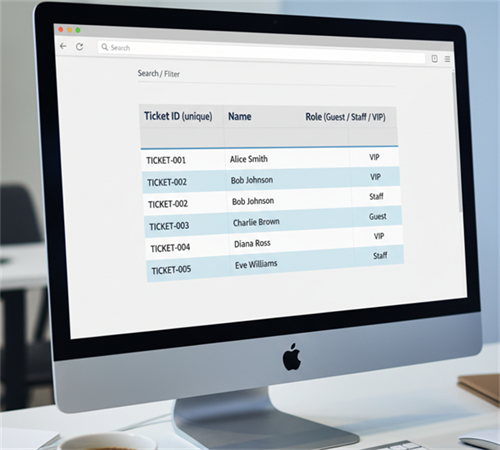
Create a spreadsheet with one row per attendee, for example:
• Ticket ID (unique)
• Name
• Role (Guest / Staff / VIP)
• Session (optional)
This is your event registration barcode source data—simple and easy to update.
Step 2: Choose a Barcode Type
For events, Code 128 is a strong choice because it's compact and supports letters and numbers, making it ideal for ticket IDs like “VIP-1032”.
Step 3: Generate Barcodes in Batches
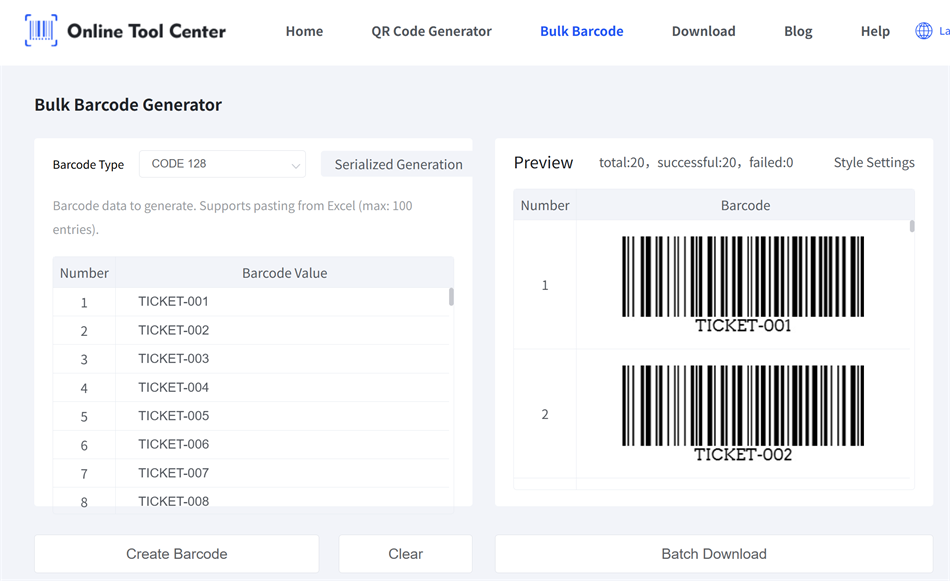
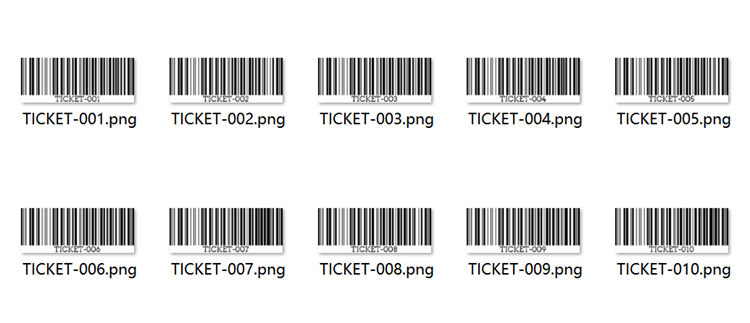
Copy and paste the Ticket ID column into your barcode generator and generate all barcodes in one batch.
When new registrations come in, you can simply generate another batch of barcodes and download them. This batch-based approach keeps the process consistent and manageable for rolling sign-ups.
Many barcode generators also allow you to adjust basic barcode properties, such as the text margin below the barcode and the output image format (for example, JPG or PNG), helping ensure the barcodes remain clear, readable, and easy to print.

Step 4: Print Tickets or Badges
Insert the generated barcodes into your ticket or badge design files, then print them using a ticket printer or label printer.
Step 5: Check-In On Site
At the event, use:
• A handheld barcode scanner, or
• A mobile phone scanning app
Scan the barcode and verify it against your attendee list to complete check-in smoothly.
Recap: A Simple Event Workflow That Scales with You
For small and mid-sized events, bulk barcode generation offers a clear, manageable way to handle tickets, badges, and check-in without unnecessary complexity.
By working with simple lists and repeatable batches, organizers can stay flexible as attendance changes, keep entry organized on-site, and focus more on the event experience itself rather than manual coordination.
